Looking for a way to store your virtual currencies? In this article, we tell you everything you need to know about Bitcoin wallets, how they work and which is the best Bitcoin wallet for you.
What Is a Bitcoin Wallet (BTC)? Definition
A Bitcoin wallet is client software designed to store your cryptocurrencies and keep them secure, either physically or digitally. A wallet consists of two elements: a public key, which corresponds to a Bitcoin address, and a private key held by its owner. Together, these two form a digital signature.
If this topic interests you, also check out “Trading Cryptocurrency” and “Bitrise Token Review“.
How Does a Bitcoin Wallet Work?
All transactions are recorded on a blockchain. By reading a blockchain, you can verify every transaction, just like in a ledger. Storing cryptocurrencies in a wallet simply means that cryptocurrencies have been assigned to an account according to a transaction; the coins themselves never leave the blockchain.
A wallet works like a safe. If you forget the keys to your wallet, you can no longer access your own safe. And if your keys are stolen, someone else will have access to it.
In theory, anyone can know your Bitcoin address and the public key associated with it and could gain access. In practice, this is only theoretical, because the funds are locked on the blockchain.
What Are the Different Types of Bitcoin Wallets?
The different types of Bitcoin wallets are desktop, mobile, web and hardware wallets. They fall into two distinct main categories, hot wallets and cold wallets, each with its own subcategories.
Bitcoin Hot Wallets
A hot wallet, also called an online or digital wallet, gets its name from the fact that it operates online: it must be continuously connected to the internet. This increases the risk, because your cryptocurrencies are exposed to cyberattacks.
Hot wallets are mostly used by investors with a short-term strategy because of their speed, accessibility and simplicity. They include web wallets such as Coinbase and Blockchain, which are the best hot wallets, and well-known mobile apps such as Bitcoin Wallet and Mycelium.
Pros | Cons |
|
|
Bitcoin Cold Wallets
A cold wallet is a physical medium for storing your cryptocurrencies offline to protect them from online attacks. Cold wallets come in several forms.
Desktop Wallets
The user has the advantage of full control over this wallet. A desktop wallet is installed on a desktop computer. It works as an address that allows the user to send and receive bitcoins, while also storing a private key. The best-known desktop wallets are Bitcoin Core, MultiBit, Armory, Hive OS X and Electrum.
Paper Wallets
A paper wallet features a QR code that only you can access. A paper wallet protects you against internet attacks. It is popular with people who hold large amounts of cryptocurrency, but you must always be careful not to lose the paper; the best option is to keep it in a safe.
What Is a Hardware Wallet?
Hardware wallets are the most secure type of Bitcoin wallet, because they store your bitcoins on a physical device that is usually connected to a computer through a USB port, as they are encrypted USB keys. They are virtually immune to cyberattacks and reduce the risk of bitcoin theft. These devices are the only Bitcoin wallets that are not free, costing between $100 and $200. Also discover Freewallet, a secure wallet.
Software Wallets
These are programs installed on computers or mobile apps that let you sell your cryptocurrencies quickly and securely.
Pros | Cons |
|
|
How to Create Your Bitcoin Wallet: Tutorial
Once you have chosen your wallet, you may be wondering how to create your own Bitcoin wallet. In this guide, we walk you through the steps to open your Bitcoin account with Ledger. First, you need to buy your Bitcoin on a platform.
Preliminary Step: Buy Bitcoin on a Trading Platform
Open a Bitcoin Wallet with Ledger
To get a Ledger wallet, you need to sign up on the Ledger website.
1. Sign Up on the Ledger Website
To get your wallet, go to Ledger’s official website. On the home page, click the “Products” menu and choose your wallet.
You can choose between the Nano X, the Nano S or a Crypto Starter Pack, as shown above.
2. Order Your Bitcoin Wallet
To place your order, simply click “Add to cart” and then “Buy”, filling in your personal details: email, address and payment method, among others.
Finally, confirm your order once you have filled in the fields.
3. Start Using Your Bitcoin Wallet
You can now store your bitcoins in your wallet. User tutorials are available on the Ledger website.
To get cryptocurrencies on a trading site, choose RaiseFX, which offers 20 cryptocurrencies for trading.
How to Open a Bitcoin Wallet with Coinbase Wallet
Wondering how to open a wallet with Coinbase? We give you the steps in this tutorial.
Step 1: Go to the Website and Download the App
Click Get It Now at the top right and download the app from Google Play or the App Store, depending on whether your device runs Android or iOS.
Step 2: Install the App
If your device runs Android, go to Google Play and tap Install to get the app. Once you have entered your email address and password, the download can begin.
Step 3: Open the App and Create an Account
You can now create your account.
Next, accept your wallet’s terms of use by tapping “Accept”.
Step 4: Fill In the Sign-Up Form
You can now fill in the sign-up form with the required information:
- A username
- Privacy settings
- How your crypto wallet will be locked: by fingerprint (if possible) or by PIN code
How to Store Your Bitcoin (BTC)
Before trading your bitcoins, you need to think about how you will store them. There are many ways to store your cryptocurrencies in wallets, including online and offline wallets.
Cryptocurrency exchanges only carry out transactions, meaning the buying and selling of cryptocurrencies. To store and protect the crypto you have just acquired, you need to look for other solutions. There are many ways to secure your cryptocurrencies, and they fall into two broad categories: online storage and offline storage.
How to Choose Your Bitcoin Wallet: Factors to Consider
The crypto asset world keeps expanding, constantly bringing innovative new devices to market. That is why we want to give you sound advice on choosing your wallet. Here are our 5 tips for making the right choice:
1. Your Choice of Cryptocurrency Platform
This is the first important step. Choosing a secure, regulated platform to buy cryptocurrency matters a great deal. It is important to hold your cryptocurrencies on the best platforms and then look for the right wallets.
2. Your Profile as a Cryptocurrency Investor
The choice of wallet depends on whether you are an advanced investor or a beginner. A beginner would turn to a more secure, easy-to-use wallet, while a more advanced trader will have no problem with a more complex system. For those with a short-term strategy, we recommend using a hot wallet without exposing themselves to too much risk. Long-term investors, on the other hand, should use cold wallets to avoid the risk of cyberattacks.
3. The Cryptocurrencies Supported by the Wallet
New cryptocurrencies keep flooding the market. Each wallet supports a certain number of cryptocurrencies. It is wiser to choose a wallet that gives you more options in terms of storage.
4. Security Comes First
You are putting your money into your wallet, so you need to be as careful as possible to avoid the risk of losing your investment. Make sure you have access to your Bitcoin private key so you keep control of your wallet. Also look for a wallet with multisignature support and the ability to use a new Bitcoin address each time, which increases the user’s privacy.
5. The Bitcoin Wallet’s Reputation
To get a better idea of the wallet you are considering, research internet forums such as the Bitcoin subreddit or Bitcoin Forum to read users’ reviews and experiences with a given wallet.
 Diversifiez votre patrimoineInvestissez dans l’artDes tableaux originaux, pièces uniques signées par l’artiste. Un actif tangible, loin des écrans et des cotations.Voir les tableaux →
How to Get a Bitcoin Wallet
A wallet may be available on the platform where you buy your bitcoins, such as RaiseFX. You can also get one by buying it online or downloading it. If you are looking for a physical wallet such as the Ledger Nano, go to the Ledger website and place your order.
How to Protect Your Bitcoin (BTC)
You want to protect your cryptocurrencies in a wallet. Here is how to protect your wallet against theft.
Enable Two-Factor Authentication (2FA)
2FA may seem complicated at first, but it is simply a link between several devices. It is very effective at protecting you against hackers, as a hacker will not be able to access your private key or password. When you log in, you are asked for a code in addition to your password. Your wallet’s security is therefore ensured, because you are the only one with access.
By SMS
One way to secure your wallet is to receive the code by SMS. You can configure your wallet’s security settings by entering your phone number. Security is ensured because every time you log in to your wallet, you receive a text message with an extra code.
Via Google Authenticator
This is an app you download to your smartphone, compatible with iOS and Android. It gives you a six-digit code linked to your wallet, which you will be asked for when you log in.
How to Back Up Your Bitcoin (BTC) Wallet
When you create your Bitcoin wallet, remember to back up your login details. This is essential to make sure you always have access to your wallet and your bitcoins. When you first log in, you will be asked to create a 12- or 24-word password in the security options to secure your bitcoins. This is known as a seed phrase, a recovery password. It is important to keep it safe so you don’t lose your bitcoins.
Which Bitcoin Wallet Should You Choose?
1. Vantage FX – Best Crypto Platform with 1:20 Leverage 2. eToro – Best Crypto Platform for Copy Trading 3. Ledger Nano X and Nano S: Best Hardware Wallets for Your Bitcoin 4. Trezor: High-Security Hardware Wallet 5. Edge Wallet: Mobile Wallet 6. Exodus: Wallet Secured by Data Encryption 7. KeepKey: Bitcoin Hardware Wallet with Anti-Virus Protection 8. Coinbase: Mobile Wallet on the Coinbase Platform |
This is a comparison of the best crypto wallets.
Best Sites to Buy Bitcoin
Before thinking about storage, you need to hold tokens. You should use reliable, secure and regulated platforms. Above, we have listed the best regulated and reliable sites on the market.
Best Bitcoin Wallet 2026: Which One to Choose?
Here are the details of the main Bitcoin wallets. Your choice will depend on your trading experience, whether you are a beginner or advanced, and on the amount you plan to hold in the wallet. You can choose between mobile, software and hardware wallets. Among the top wallets listed below, you will see which one suits you best.
1. Ledger Nano X: Best Hardware Wallet with Large Storage for BTC
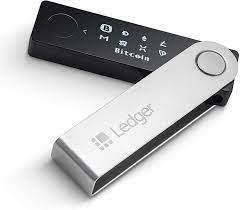
This is a hardware wallet made by Ledger in the shape of a USB key, with 2048 KB of storage memory. The Ledger Nano X supports 1,500 cryptocurrencies, including Bitcoin, Ethereum, Ripple, Monero and many more. Security on this wallet is ensured by data encryption and manual validation. It differs from the Nano S in that it supports Bluetooth transfers.
The Nano X works with iOS, Android, Windows, Mac and Linux.
Cryptocurrencies Supported by the Ledger Nano X:
The Ledger Nano X can store up to 1,500 cryptocurrencies, such as Tether, Stellar, Monero, Ethereum and Bitcoin.
Ledger Nano X Price:
The Ledger Nano X is priced at €119 on Ledger’s official online store. Some resellers offer this wallet at lower prices, but always check their reliability before buying.
Pros:
- Easy to get started
- More secure
- Swap feature available
- Large storage capacity
Cons:
- More expensive than the Nano S
- Higher fees
- More complex crypto purchase process
2. Ledger Nano S: Best Value for Money for Bitcoin
Wallet type: Cold wallet
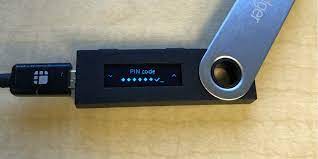
This is the first generation of hardware wallet produced by Ledger. Its memory is fairly limited, but it can support 1,500 cryptocurrencies and Ethereum ERC-20 tokens.
It differs from the Nano X in that it has no Bluetooth connectivity, and it supports 6 apps.
Cryptocurrencies Supported by the Ledger Nano S:
The Ledger Nano S hardware wallet can store up to 1,500 cryptocurrencies as well as Ethereum ERC-20 tokens.
Nano S Price:
The Nano S costs $59 on the website, less than the Nano X.
Pros:
- Simple but highly functional
- Very secure
- Supports a large number of cryptocurrencies
Cons:
- High fees
- No Bluetooth connectivity
- Supports only 6 apps
3. Trezor Model T

The Trezor Model T is easy to use, especially for beginners, thanks to its touchscreen. The Trezor has a microSD card slot, which makes PIN encryption easier and protects you against attacks.
The Trezor Model T currently supports more than 1,600 different cryptocurrencies. Some users consider the Model T more secure than the Ledger Nano X because of the latter’s Bluetooth connectivity (even though Bluetooth on the Ledger is optional). The Trezor T is compatible with iOS, Android, Mac and Linux.
Trezor Model T Price:
It is more expensive, at $181, with several options.
Cryptocurrencies Supported by the Trezor Model T:
The Trezor Model T hardware wallet can support up to 1,600 different cryptocurrencies.
Pros:
- Intuitive touchscreen
- Enhanced security
- Easy to use
Cons:
- Higher price
- No dedicated app
4. Coinbase Wallet: Mobile Wallet Secured by Multisig for BTC

Coinbase Wallet is a downloadable mobile cryptocurrency wallet linked to the Coinbase platform, offering a higher level of security. This wallet provides multi-signature security for the 100,000 virtual currencies, such as Bitcoin, Ethereum, Litecoin and ERC-20 tokens. The wallet can also carry out cryptocurrency transactions on other platforms.
Cryptocurrencies Supported by Coinbase Wallet:
For now, Coinbase Wallet still supports fewer cryptocurrencies. It can store Bitcoin, Bitcoin Cash, Ethereum Classic, Ethereum, Litecoin and ERC-20 tokens. A special feature of this wallet is the ability to store virtual collectibles and even monsters.
Coinbase Wallet Fees
Downloading the Coinbase Wallet app is completely free on both Android and iOS, as is opening a wallet. However, transactions and trading are charged. Fees currently start at 1.49% depending on the cryptocurrency and market conditions.
Pros:
- Very secure
- Send and receive cryptocurrencies with other platforms
- Interacts with decentralized apps (dApps)
Cons:
- Difficult to access
- High transaction fees of between 1.49% and 4.99%
5. Bitcoin Wallet: Decentralized Mobile Wallet for Bitcoin
Bitcoin Wallet is an open-source mobile app available to everyone. What sets it apart is that it is a decentralized wallet that requires no sign-up. It keeps your cryptocurrencies secure with greater privacy. Bitcoin Wallet can also convert cryptocurrencies into fiat.
Cryptocurrencies Supported by Bitcoin Wallet
As its name suggests, Bitcoin Wallet only supports bitcoin. Transactions can be made via Bitcoin URLs, NFC or QR codes.
Pros:
- Bluetooth connectivity
- Secure platform
- Decentralized system
- Open-source app
Cons
- Supports Bitcoin only
- Slow transactions
6. Electrum: A Bitcoin-Only Wallet
Wallet type: Hot wallet with a cold storage option
Compatible hardware wallets: Trezor, Ledger and many others.
Electrum is perfect for more advanced bitcoin holders who want excellent security and customization features, all in a simple layout.
Cryptocurrencies Supported by Electrum
Electrum is a wallet built to support Bitcoin only.
Electrum Fees
Opening an Electrum wallet is completely free. However, cryptocurrency transaction fees are charged and come in several tiers. Fees of 0.1 to 0.2 mBTC are deducted each time you send BTC.
Pros:
- Customizable transaction fees
- Higher security level than most e-wallets
- Customizable seed phrase
Cons:
- Minimal user interface
- Works for bitcoin only
- No customer support
7. KeepKey: Sleek Design

KeepKey is a hardware wallet with a sophisticated design, popular with users who care about aesthetics. It is seen as a competitor to the Ledger Nano S and features a large screen for better usability.
Pros:
- User-friendly
- More than 50 supported currencies
- Very high security
- Open-source software
Cons:
- Bulky
8. Mycelium: Best Mobile Bitcoin Wallet App
Wallet type: Hot wallet with a cold wallet option

Price: Free
Mycelium is quite similar to Electrum, except that it is mobile-only (a Bitcoin crypto wallet app), its user interface is more modern than Electrum’s and it has a built-in exchange. Compatible hardware wallets: Trezor, Ledger and KeepKey.
Pros:
- Customizable transaction fees
- Can be used with hardware wallets
- Open-source software
Cons:
- Mobile only
- Confusing for first-time users
9. MyEtherWallet (MEW)

MyEtherWallet is open-source software built on the Ethereum blockchain. It is one of the most reassuring wallets thanks to its reliability and simplicity, and it keeps impressing its users. Security is ensured through control of private keys, and creating a wallet requires no verification.
Pros:
- Open source
- Supports ERC-20 tokens
- Useful intermediate interface
Cons:
- Cannot connect directly to an exchange
10. Exodus: Ideal for Beginners
Exodus wallet is a desktop and mobile wallet with a very simple user interface and a built-in exchange. Exodus currently lets you exchange between more than 100 different cryptocurrencies. It is ideal for beginners and also stands out for its power, efficiency and simplicity. Its drawback is that it is a closed-source wallet.
Pros:
- Ideal for beginners
- Powerful, efficient and modern
- Makes managing and exchanging cryptocurrencies easy
- Intuitive interface
- User-friendly
Cons:
- Closed-source software
- Higher fees than other wallets
Conclusion: What Is the Best Bitcoin Wallet in 2026?
Cryptocurrency keeps gaining ground in the market. That is why we have recommended the best wallets for storing your cryptocurrencies. Security remains the key factor in every trader’s choice, so many turn to hardware wallets, which offer much more security and are also more convenient. We recommend the Ledger Nano X, the safest physical wallet.
Remember that the first step is to trade on a secure platform, which you can easily do with RaiseFX.
Read also: Ripple Wallet