More and more investors have been rushing into Dogecoin since Elon Musk’s tweets, so you may be wondering which wallet to use to store your Dogecoin. Here is everything you need to know about the best Dogecoin wallets and how they work.
What Is a Dogecoin (DOGE) Wallet? Definition
A Dogecoin wallet is client software designed to secure your Dogecoin, either physically or digitally. A wallet consists of two keys: a public key, which corresponds to a Dogecoin address, and a private key held by the owner of the Dogecoin; together they form a digital signature.
To dig deeper, also read our guides “Ethereum Wallet” and “Jaxx Wallet Review“.
Dogecoin Wallet – How Does It Work?
For your Dogecoin wallet to work, you need a public key and a private key. Below we explain how these two keys work, as well as the blockchain.
- Public key
This is a long sequence of numbers and letters that serves as your wallet address. The public key lets users make cryptocurrency transfers. It works like your bank card number when you send to or receive from another user.
- Private key
A private key is the key you use to access the funds in your account. It allows the key’s owner to control and manage the account. Your private key must be kept secret, because if it is shared your cryptocurrency can easily be stolen. That said, some wallets do not give users access to their private keys, which leaves your cryptocurrency more vulnerable to various attacks.
The Blockchain
But public and private keys are not the only key players in your transactions: there is also the blockchain. The blockchain is used to carry out transactions and determine your balance; operations are broadcast as transactions to speed up your exchange.
Once your transactions are complete, it means you have transferred one or more cryptocurrency tokens. But be careful with the recipient’s public key, otherwise your tokens could be lost.
All your transactions are recorded on a blockchain, a bit like a history of your operations. Note that in a transaction the tokens never leave the blockchain; only the address of the recipient changes.
So a wallet works like a safe: if you forget your password, it would be impossible to recover your cryptocurrency. It is therefore advisable not to share your private key with anyone, to avoid being scammed. To learn more, read our Dogecoin review.
What Are the Different Types of Dogecoin Wallets in 2026?
There are different types of Dogecoin wallets, such as desktop wallets, mobile wallets, web wallets and hardware wallets. They fall into two categories: hot wallets and cold wallets, each with further subcategories.
Hot Wallets
A hot wallet, or digital wallet, is a wallet that works online. As the name suggests, you must always be connected to the internet for it to work. As a result, it increases your exposure to hacking.
It is more useful for short-term investors, as hot wallets stand out for their simplicity, speed and accessibility. Well-known hot web wallets include Coinbase and Blockchain, which are among the best, but they also include mobile apps such as Dogecoin Wallet and Coinomi.
Cold Wallets
A cold wallet is the complete opposite of a hot wallet: it works offline because it is a physical medium. Cold wallets come in different forms.
- Desktop wallets
The advantage of this wallet is that the user has full control over it. As its name suggests, it is installed on a desktop computer. It works as an address that lets the user send and receive cryptocurrencies such as Dogecoin. The user can also hold a private key.
- Paper wallets
A paper wallet gives you a QR code that only you can access. It protects you against online attacks. Paper wallets are used far more by people who hold large amounts of cryptocurrency, but you must be careful not to lose the paper; the best option is to keep it in a safe.
- Hardware wallets
A hardware wallet is the most secure of all, as it stores your cryptocurrency on a physical device, more specifically an encrypted USB stick that connects to the computer via a USB port. With this type of wallet, you are protected against hackers. But they are not free: prices range from $100 to $200.
- Software wallets
Software wallets are programs you install on your device so you can sell your cryptocurrencies more quickly and securely.
Dogecoin Wallet for Windows
To use a Dogecoin wallet on Windows, you need to sync with the blockchain.
On the Dogecoin website you will find two wallets. MultiDoge is a “lightweight” wallet that downloads only what is necessary for faster syncing. If you want a more “complete” wallet, Dogecoin Core is the one for you, as it is very reliable for large transactions.

How to Store Your Dogecoin (DOGE) in 2026
Before trading your Dogecoin, you should already be thinking about how to store it. You can choose to store it in an online wallet or an offline wallet. But make sure you are well informed, as some platforms only handle trading. If you use these platforms, you should look for other solutions such as online and offline storage.
Dogecoin Wallet – How to Choose Your Dogecoin Wallet in [userip_location type=”country”]
Crypto wallets keep evolving. This has led us to give you a few tips to make the right choice:
- Choosing your crypto trading platform
To start with, choose your trading platform carefully: it must be regulated and secure. You should buy your cryptocurrencies through the best brokers before choosing the best wallet.
- Your investor profile
Choose the wallet that best suits your profile. Beginners are advised to choose a hot wallet, which is easy to use and secure for short-term investing. Professionals are advised to use cold wallets, which are a little more complex but will not cause experienced users much difficulty; they are also better suited to long-term investing as they are much more secure against cyberattacks.
- The cryptocurrencies the wallet supports
Since 2009, new altcoins have kept appearing on the market. So it is better to choose a wallet that supports a wide range of cryptocurrencies and has more storage space for your crypto.
- Wallet security
Since you will be storing your money in your wallet, it is essential to know how the wallet is secured to avoid any kind of risk. Make sure you hold a private key so you control your wallet, and check whether the wallet offers multisignature protection and lets you use fresh Dogecoin addresses to increase your privacy.
- The Dogecoin wallet’s reputation
Do some research on Dogecoin forums to get a broader view of the wallet and learn about users’ reviews and experiences with particular wallets.
How to Get a Dogecoin Wallet
You can get a wallet on the platform where you bought your Dogecoin, such as eToro. You can also get one by downloading it or buying it online. If you want a physical wallet, you need to order it from the manufacturer’s website, such as Ledger.
Dogecoin Wallet – How to Protect Your Cryptocurrency
Wondering how to protect your cryptocurrency? Here are a few ways to protect your wallet against theft:
- Two-factor authentication (2FA):
2FA sounds a little hard to understand, but in reality it is just a link between several devices. If you are afraid of being attacked by hackers, you will be well protected, because without the private key or password you cannot access the account. On top of that, when you log in, you are asked for a code in addition to your password. It is one of the most secure systems, as only you will have access to your account.
- SMS:
You can also receive the code by SMS to secure your wallet. You can set up your wallet by entering your phone number. You will then be protected, because each time you log in a new code is sent by SMS.
- Google Authenticator:
This is an app available for Android and iOS that you need to download. You then receive a 6-digit code linked directly to your wallet, which you will be asked for when you log in.
Dogecoin Wallet – How to Back Up Your Wallet
When you create a Dogecoin wallet, always remember to back up your login details. It is important to always have access to your wallet and your Dogecoin. During sign-up you will be asked to create a 12- or 24-word password to secure your Dogecoin. This password is called a “seed phrase” and is your recovery password. You need to remember it to avoid losing your Dogecoin.
Best Bitcoin Crypto Wallet 2026: Comparison Table
Brokers To go further on this point, our Cryptonator Wallet Review 2026 – Reliable Crypto Wallet or Not? covers the topic in depth. | Regulation | Headquarters | Founded | Min. deposit | Discover |
 |
|
| 2009 | $200 | Try Broker |
 |
| Seychelles | 2015 | $20 | |
 |
|
| 2014 | $25 |
10 Best Crypto Wallets in 2026: Which Dogecoin Wallet Should You Choose?
- eToro – Best Crypto Platform for Copy Trading
- Vantage – Best Crypto Platform with 1:20 Leverage
- AvaTrade – Crypto Platform with the Widest Choice
- Ledger Nano X: Large Storage Capacity
- Trezor: High-Security Hardware Wallet
- Coinbase: Mobile Wallet on the Coinbase Platform
- Dogecoin Wallet: Decentralized Mobile Wallet
- Exodus: Wallet Secured by Data Encryption
- KeepKey: Bitcoin Hardware Wallet with Anti-Virus Protection
- Coinomi: Hot Wallet with Built-In Exchange
 Diversifiez votre patrimoineInvestissez dans l’artDes tableaux originaux, pièces uniques signées par l’artiste. Un actif tangible, loin des écrans et des cotations.Voir les tableaux →
Best Dogecoin Wallet 2026 – Which One to Choose?
Below we look at the different Dogecoin wallets in detail. Your choice will most likely depend on your profile, whether you are a beginner or experienced, and on how much money you plan to keep in the wallet. You can choose between several types of wallets, such as mobile, software and hardware wallets. Pick the one that suits you best from those detailed below.
Ledger Nano X: The Best Hardware Wallet with Large Storage for Dogecoin (DOGE)
The Ledger Nano X is a hardware wallet developed by Ledger in the form of a USB stick with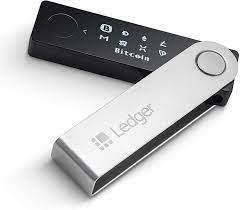 2048 KB of storage. In terms of security, you have nothing to worry about, as the device’s data is encrypted and you must also confirm manually to access it. It differs from the Nano S in that it has Bluetooth connectivity.
The Ledger Nano X is compatible with iOS, Android, Windows, Mac and Linux.
- Cryptocurrencies supported by Ledger Nano X:
It can store up to 1,500 cryptocurrencies, such as Dogecoin, Bitcoin, Ethereum, etc.
- Ledger Nano X price:
It costs €119 on the Ledger website.
Ledger Nano S: Best Value for Money for Dogecoin
The Ledger Nano S is a wallet with limited memory, but it can still support different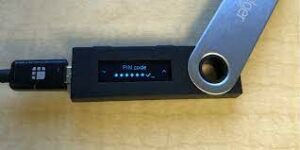 types of cryptocurrencies. It differs from the Nano X in its lack of Bluetooth and the number of apps it can support.
- Cryptocurrencies supported by Ledger Nano S:
It can store up to 1,500 cryptocurrencies, such as Dogecoin, Bitcoin, Ethereum, etc.
- Ledger Nano S price:
It costs €59 on the Ledger website.
- Pros and cons:
Pros | Cons |
|
|
Trezor Model T
It is one of the easiest to use, as it has a touchscreen; you can also add an SD card, which makes it easier to add a PIN code to protect against attacks.
- Cryptocurrencies supported by Trezor Model T:
It can store up to 1,600 different cryptocurrencies, such as Dogecoin, Bitcoin, Ethereum, etc.
- Trezor Model T price:
The price ranges from $100 to $200, depending on the options included.
- Pros and cons:
Pros | Cons |
|
|
Coinbase Wallet: Highly Secure Multisig Mobile Wallet for DOGE
 Coinbase Wallet is a downloadable wallet from the Coinbase platform that offers extra security. It uses a multi-signature system to better protect its users. You can also transfer your cryptocurrencies to other platforms with Coinbase Wallet.
- Cryptocurrencies supported by Coinbase Wallet:
It does not support many cryptocurrencies yet, but it can store Dogecoin, Bitcoin, Litecoin, Ethereum and ERC-20 tokens. You can also store virtual monsters and collectibles with it.
- Coinbase Wallet price:
Downloading the app and creating a wallet are free, but you are charged on every trade. Fees start at 1.49%.
- Pros and cons:
Pros | Cons |
|
|
Dogecoin Core: The Official Wallet of the Dogecoin Foundation
 Dogecoin Core is the native wallet of the Dogecoin platform. It offers all the features of standard wallets, but it takes longer to install because it must first download the entire blockchain; you will be told about this at the start.
- Cryptocurrencies supported by Dogecoin Core:
As its name suggests, it only supports Dogecoin.
- Dogecoin Core price:
Free trial; pricing is on request and depends on the plan chosen.
- Pros and cons:
Pros | Cons |
|
|
MultiDoge: Simple Hot Wallet with Data Encryption
 MultiDoge is also a native wallet of the Dogecoin platform. It offers all the features of standard wallets, but unlike Dogecoin Core it does not download the entire blockchain.
- Cryptocurrencies supported by MultiDoge:
As its name suggests, it only supports Dogecoin.
- MultiDoge price:
Free trial; pricing is on request and depends on the plan chosen.
- Pros and cons:
Pros | Cons |
|
|
KeepKey: Hardware Wallet with Virus Protection
 KeepKey stands out from other hardware wallets thanks to its sophisticated, aesthetics-focused design. It competes with the Ledger Nano S, but its large screen makes it more ergonomic.
- Cryptocurrencies supported by KeepKey:
It supports Dogecoin, Bitcoin, Ethereum and Litecoin, as well as 46 ERC-20 tokens.
- KeepKey price:
Between €50 and €100.
- Pros and cons:
Pros | Cons |
|
|
Coinomi: Hot Wallet with Built-In Exchange
 Coinomi is one of the free wallets that supports a wide choice of cryptocurrencies. According to analysts, it is even the best free wallet.
- Cryptocurrencies supported by Coinomi:
It can store Dogecoin as well as more than 1,500 other cryptocurrencies.
- Coinomi price:
Free
- Pros and cons:
Pros | Cons |
|
|
Jaxx: Cross-Platform Dogecoin Wallet
 Jaxx is a wallet available on several devices. One of its features is that you keep control of your private keys. With its built-in ShapeShift feature, it is easier to use.
- Cryptocurrencies supported by Jaxx:
It is compatible with Dogecoin as well as several other cryptocurrencies.
- Jaxx price:
Free
- Pros and cons:
Pros | Cons |
|
|
Exodus: Very Easy for Beginners
 Exodus is a mobile and desktop wallet that is very easy to use if you are a beginner. As well as being easy to use, it is powerful, efficient and simple, and it even has a built-in exchange.
- Cryptocurrencies supported by Exodus:
It supports more than 100 different cryptocurrencies, including Dogecoin.
- Exodus price:
Free
- Pros and cons:
Pros | Cons |
|
|
Conclusion: Which Dogecoin Wallet Should You Choose in 2026?
Since the crisis, virtual currencies have kept attracting new investors. That is why we have suggested the best wallets to store your Dogecoin. But as we always say, security comes first. So it is better to go for a hardware wallet, as they are more practical and much more secure. In that case, we recommend the Ledger Nano X, one of the most secure wallets on the market.
But don’t forget that, above all, you should trade on a platform with a good reputation, such as eToro.
Have questions or want to share your experience with a Dogecoin wallet? Leave us a comment!
Read also: Carbon Wallet Review · Lumi Wallet Review · Bread Wallet Review