 MetaTrader 4, or MT4, is currently the best trading platform for technical analysis and strategy building. This complete MetaTrader 4 guide explains how the platform works, how to use it, and how to choose the best MT4 broker offering this free Forex and CFD trading software.
How to Download MT4
First, let’s look at how to download the free MetaTrader 4 platform. You can of course go directly to the developer’s website, where you will find a download link for your device (Windows PC, Mac, mobile, etc.).
However, we recommend downloading it from your broker’s website instead, as this will usually give you access to client benefits as soon as you open your live account.
Once the platform is downloaded to your computer, installing it is simple: just follow the on-screen instructions. If needed, you can easily find an MT4 tutorial to help you with the installation.
How to Open a Live Account on MT4
- Go to your broker’s homepage and click “Open a live account”. This takes you to the registration page, where you simply fill in a short form with some personal details.
- Once you have entered your personal details, double-check them and click the “Next” button.
- You will then reach a second form asking for your address and other information, including your current employment status, annual income, the funds available for investing, the source of those funds and the industry you work in.
- Next, select the MetaTrader 4 platform and the account type you want to open, such as “Standard STP”, and your base currency, such as the euro (EUR). Make sure to tick the box accepting the terms and conditions before clicking “Next”.
- You will then reach the identity verification page, a mandatory step to keep your account secure. Here you can upload a photo or copy of your ID card or passport, plus proof of address such as a recent electricity, gas or phone bill, along with your bank details (IBAN). You can skip this step and come back to it later if you don’t have these documents to hand; in that case, you can send them by email. Finally, click the “Finish” button.
Your MetaTrader 4 live account is now open. All that remains is to deposit the funds you want to invest so you can start trading the assets of your choice.
How to Deposit Money on MT4
Once your MetaTrader 4 live account has been created, you will need to deposit money into it by bank card or PayPal before you can start investing.
However, MetaTrader 4 has no built-in deposit or withdrawal function, so you need to do this through your broker.
With Vantage, simply log in to your account using the button at the top of the screen, then follow these steps:
- Click the “Fund / Deposit Funds” button on the left.
- Select your preferred deposit method (bank card, bank transfer, Neteller, Skrill).
- Choose the amount to deposit and follow the instructions for the method you selected.
- Your account is now funded. Note that some deposit methods involve a waiting period before the account is credited.
How to Trade on MT4
Trading on MetaTrader 4 is fairly simple and intuitive, and any investor who knows how to place an order can do it easily.
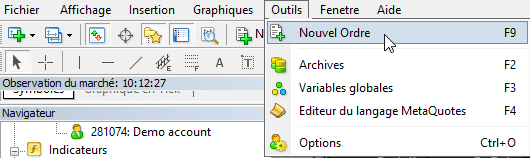
Once you have selected an asset, just open the “Order” window to place an instant market order. Here are the steps:
- Click “New Order” at the top left of the platform.
- Choose your lot size by filling in the “Volume” field.
- Select “Buy” or “Sell” depending on the direction you want to trade.
Closing a position on MT4 is just as simple. On the MetaTrader 4 chart, right-click the dotted red line that marks your entry level to bring up the “Close” option. Your order will then be closed automatically.
How to Choose the Best MT4 Broker
- Choose a reliable, regulated MT4 broker
- Compare each MT4 broker’s fees and spreads
- Consider the services and tools offered on top of MT4
- Check customer reviews for each MT4 broker
Why Use MetaTrader 4 for Trading
There is a good reason MetaTrader 4 has become the most popular trading platform in the world: as you will see below, it offers a wide range of advantages. So if you are wondering which trading app is best in 2026, the answer is still MetaTrader 4.
The Advantages of MetaTrader
MT4 is currently regarded as the best stock market trading software. You only need to read MetaTrader 4 reviews written by beginners and professional traders alike to see why. The platform is packed with advantages, including:
- Advanced trading technology such as MetaTrader 4 technical analysis. Interactive charts can be displayed across 9 timeframes, with 23 analytical objects and 30 MT4 technical indicators.
- Flexible trading with a range of order types, including 3 execution modes, 2 market orders, 4 pending orders, 2 stop orders and 1 trailing stop.
- The Market built into MetaTrader 4 also gives you access to thousands of additional indicators to take your analysis even further. You can download a free MT4 spread indicator or any other indicator directly from the platform.
- Another plus is the ability to use MT4 copy trading or algorithmic trading, either to copy other traders’ trades automatically or to set up an automated trading strategy with robots called Expert Advisors (EAs), many of which are free for MT4, just like copy trading.
- Finally, if you know the MQL4 language, you can also develop your own Expert Advisors in MetaTrader 4.
MT4: The Best Analysis Software
Although there are more and more free technical analysis tools on the market today, MetaTrader 4 is considered the benchmark by traders and brokers alike.
First of all, MetaTrader is the most popular free trading software and also the oldest on the financial markets. It was developed by MetaQuotes Software, and the MetaTrader 4 platform quickly established itself as the best, largely thanks to its distinctive features.
What sets MetaTrader 4 apart from other trading platforms is that it lets both retail and professional traders design their own algorithms and custom indicators. These are added to the indicators MT4 provides as standard, such as oscillators, Momentum or trend indicators.
Beyond its extensive settings, configuration and customization options, MetaQuotes designed MT4 with different investor profiles in mind, which is why it offers a wide range of technical and fundamental analysis tools.
In terms of strategy, MetaTrader 4 supports day trading, scalping and swing trading, depending on your preferences and profile.
It is also worth remembering that MetaTrader 4 is a free trading platform that receives regular updates to improve its stability as well as the range and quality of features available to traders. This is another reason why MetaTrader 4 for web, PC or Apple Mac is offered by so many brokers in both live and demo versions. In other words, you can download MetaTrader 4 for zero euros.
Markets You Can Trade on MT4
- Forex – You can trade currencies on the Forex market using the best MT4 indicators. Depending on your broker, you will have access to a range of major and exotic currency pairs such as EURUSD, GBPUSD, USDJPY and many more.
- Indices – MetaTrader 4 also lets you trade stock indices such as the CAC 40, DAX 40, Dow Jones and many others, including index futures and cash indices.
- Commodities – Commodities can also be traded on MetaTrader 4, including precious metals like gold and silver, base metals like steel and iron, energy commodities like oil and gas, and agricultural commodities like coffee and cocoa.
- Cryptocurrencies – If your broker offers crypto, you can speculate on cryptocurrencies from your MT4 platform, including Bitcoin, Ethereum, Ripple and Litecoin.
- Stocks – Finally, some brokers also let you trade shares on various stock exchanges with MetaTrader 4.
How to Display the Available Markets on MT4
MT4 has a dedicated feature showing which markets and assets you can trade. Here is how to enable it:
- First, click the “Market Watch” tab at the top left of your screen.
- Choose the “Show All” option.
- You will now see all the instruments offered by both MetaTrader 4 and your broker.
You can of course choose to display only certain assets. To do so, still in the “Market Watch” tab, click “Symbols”, select the assets you want to display and click “Show”.
This list also gives you direct access to each asset’s chart: click the asset and select the MetaTrader 4 chart tab. You can then trade directly from these charts.
Automated Trading on MT4
One of MetaTrader 4’s distinctive features is algorithmic, or automated, trading. It allows you to develop, test and apply technical indicators and Expert Advisors. Creating an MT4 Expert Advisor is fairly straightforward, and EAs are well suited to scalping, hedging and many other methods and strategies.
Thanks to the MQL4 IDE (integrated development environment), you can build trading robots, or Expert Advisors, as well as technical indicators that are more complex than support and resistance or other standard MT4 indicators.
The platform includes MetaEditor, which is designed for developing complex trading strategies in MQL4 and comes with a built-in debugger. Once the editor has compiled the program, it is automatically transferred to MetaTrader 4, where it can be tested.
Your indicators then analyze the markets on MetaTrader 4 while your Expert Advisors trade on that basis. You can also use your indicator or EA in other ways: publish it in the Code Base so that millions of traders can download it for free, sell it on the Market, or sell it to a client through the Freelance service.
The MT4 Automated Trading Championship
MetaTrader has also run an automated trading championship, which is essentially a competition between trading robots. For several years, traders who built MQL4 EAs competed for a prize of 80,000 USD.
 Diversifiez votre patrimoineInvestissez dans l’artDes tableaux originaux, pièces uniques signées par l’artiste. Un actif tangible, loin des écrans et des cotations.Voir les tableaux →
MT4 Web and Mobile Apps
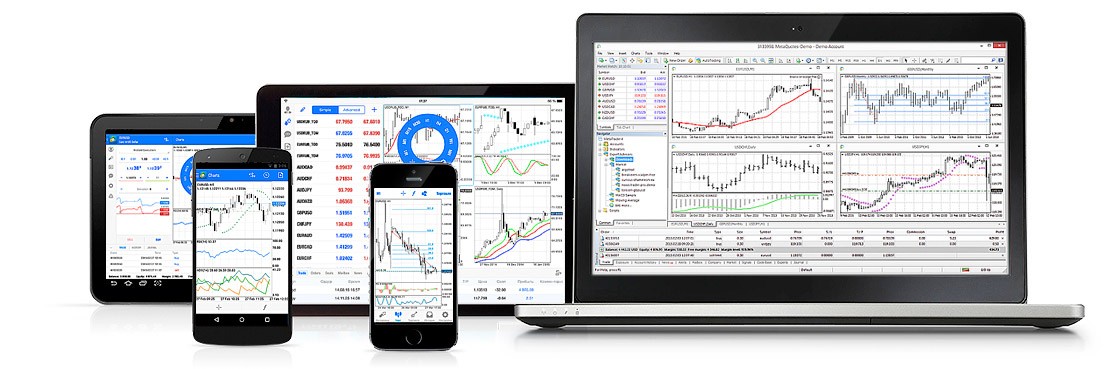
While the MetaTrader 4 desktop software is the most widely used and many traders choose to download MT4 for PC or Mac, there are other versions too: a no-download version, MetaTrader 4 WebTrader, and a mobile version, MT4 Mobile.
MT4 WebTrader
Some brokers, such as Vantage, offer the MetaTrader 4 WebTrader platform in addition to the classic version. It requires no download, so traders can invest directly online from a browser on any operating system, whether Windows, Mac or Linux. This also solves the problems of getting MetaTrader 4 on OS X or macOS Catalina.
Trading on this online platform is simple and fast, and lets you monitor your trading accounts, open and close positions, and analyze the market in real time.
Advantages of MetaTrader 4 WebTrader
Advantages |
|
MT4 WebTrader Advantages in Detail
As we have just seen, MT4 WebTrader is designed to be easy to use. It lets you place market and pending orders and analyze the performance of your live accounts, with real-time pricing, technical analysis and real-time account information.
MetaTrader WebTrader gives you access to the same markets and instruments as the downloadable version, the only difference being that it was built for the web and works optimally in all browsers. The platform is also secure, protecting your transactions with 128-bit data encryption.
But its main advantage is of course that you can access your trading accounts wherever you are, not just from your main device. MT4 WebTrader works in all major web browsers, including Chrome, Mozilla Firefox, Internet Explorer, Opera and Safari.
MT4 on Mobile
MetaTrader 4 is also available on mobile phones and smartphones, so you can access the financial markets on the go, and it also runs on iOS and Android tablets.
The mobile versions have somewhat more limited features, but they include interactive price charts, all order types and the most widely used technical analysis tools. You can manage your accounts, track your position history and quickly buy and sell all available financial assets.
The MT4 apps for Android and iOS also offer a few extra features, such as live chat with other traders and custom notifications.
MT4 for iPhone
You can download MetaTrader 4 on your iPhone. Brokers that offer it provide a link to the app’s download page on the App Store.
MT4 for Android
If you have an Android smartphone, you can also download MT4 by following the link to the app’s download page on the Play Store.
Key Features of the MT4 Platform
It is thanks to its many features that MT4 is now considered the best trading software in the world. Below, we take a detailed look at the main tools that have been added and developed on this user-friendly, dynamic and constantly evolving platform.
MT4 and Multiple Accounts

First, one of MT4’s distinctive features is that it lets you hold several accounts at the same time. While most traders are content with a single trading account, others prefer to have several, even with the same broker, and use them for different purposes as part of a more diversified strategy.
For example, a scalper could test a scalping EA on a limited-risk MT4 account while trading other strategies on a separate account.
You can also have both a live account and a demo account on the platform, so you can test different strategies in demo mode before applying them to your live account.
MT4 and Automated Trading
As mentioned above, automated or algorithmic trading is another real strength of MT4. Trading robots, or Expert Advisors, are increasingly popular with investors today, whether for backtesting, executing trading strategies or receiving trading signals.
MT4 is currently the most complete platform for automated and algorithmic trading, thanks to its user-friendly built-in MQL programming environment, which lets developers easily create and deploy the automated programs they have built.
To do this, it uses the MQL4 IDE, which lets you create or buy programs and run them on the platform.
A Large Community of MQL4 Developers
The MQL4 community competes directly with the social trading solutions offered by brokers such as eToro, which let traders follow other traders and copy their orders automatically.
The advantage of the MQL4 community is that its members come from many different brokers, so the resulting signals market is both more transparent and more extensive. You can join the community whichever broker you are registered with.
To access the MQL4 website, simply go to the Signals section at the bottom of the MT4 interface and choose a trader to follow based on the performance you are looking for. And if you are among the best-performing traders, you can also monetize your knowledge and experience by selling your own signals.
The most successful traders can register as trading signal providers. Other community members then pay a monthly subscription fee to access your services and can, if they wish, copy your trades from their own accounts.
The MQL4 community is currently the largest commercial trading community in the world.
A Wide Range of Indicators
As the oldest platform in retail trading, MT4 naturally also has the widest range of built-in indicators, and that range keeps growing.
It offers a very broad selection of indicators, including moving averages, the stochastic oscillator, trendlines, Fibonacci lines, the RSI and the Ichimoku indicator. There are of course other indicator providers on the market, but the vast majority of them charge for their indicators.
Another advantage of MT4’s technical indicators is that they are updated automatically on a regular basis, without you having to do anything. Here are the 5 types of indicators available as standard in this trading software:
- Trend indicators – These show the direction of the trend, such as Ichimoku, Bollinger Bands and moving averages.
- Oscillators: These indicators show how price oscillates between overbought and oversold levels. They include the MACD, the stochastic indicator and the RSI, among others.
- Volume indicators: These provide information on buying and selling volumes, such as Accumulation/Distribution, Volumes, the Money Flow Index and others.
- Bill Williams indicators: These are actually hybrid indicators, such as the Alligator and the Market Facilitation Index.
- Custom indicators: Here you will find all the indicators mentioned above as well as others such as the ATR, CCI, Parabolic SAR and ZigZag.
How to Open a Demo Account on MT4
- Go to the broker’s website. On the homepage, you will find a “Live account” button and a “Demo account” button. Choose the blue demo account button to start the registration process.
- You will then reach the registration form to create your Vantage demo account. Fill it in with some personal details, such as your contact information, just as you would when opening a live account.
- Next, choose an account type. Vantage offers several types of live accounts, and the same applies to the demo account. Each account offers different levels of risk and capital, so choose the type that matches the one you plan to open in live mode.
- You will then be asked to choose the platform you want to trade on: MT4 or MT5. Before choosing or using either platform, it is worth reading a MetaTrader 5 demo or MetaTrader 4 guide.
- Finally, select the currency you will use and move on to the next step.
Once you have tested your trading strategies on the demo account, you can switch to live mode to make a profit from your positions.
How to Use MT4
- Open an account with a reliable broker
- Download the MT4 platform
- Open a position to start trading
- Monitor and close your positions and pending orders
- Adjust stops and limits on open positions
- Customize MT4 charts
- Draw on charts
- Add MT4 indicators
- Change the timeframe
- Set a price alert
- View your trade history
- Download trading reports
Conclusion: Which MT4 Broker to Choose in 2026?
Given all the criteria to weigh up, finding the best MT4 broker in 2026 can seem difficult. That is why we have selected the best brokers on the market offering this trading platform.
From this selection, we particularly recommend Vantage, which offers many advantages, including several versions of the MetaTrader platform: MetaTrader 5, MetaTrader WebTrader, and MT4 and MT5 for mobile and iPad tablets.
Have you tried MetaTrader 4 and want to share your experience? Let us know what you think by leaving a comment!