Trading platforms are an essential tool for every trader or investor, but how do you know which one is right for you? In this ProRealTime review, we tried and tested the ProRealTime platform for you. Designed by the French company IT-Finance specifically for traders and technical analysts, it is a powerful and unique tool: web-based software saved on the company’s cloud network, offering a wide range of advanced charting and analytical tools.
 | |
Value | ★★★★☆ 4/5 |
Ease of Use | ★★★☆☆ 3.5/5 |
Performance | ★★★★☆ 4/5 |
Technical Tools | ★★★★☆ 4.5/5 |
ProRealTime is a technical analysis platform that lets you automate trading across a wide variety of assets. Its features include charts and technical indicators, an advanced market scanning tool called ProScreener and an advanced backtesting tool called ProBacktest. To learn more about this technical analysis platform, read our full ProRealTime review. ★★★★☆ 4.5/5 | |
You are probably wondering how the ProRealTime platform works. We tested it ourselves for a month so we could give you our ProRealTime review and the information you need before making a decision.
Our test of the ProRealTime platform is independent.

ProRealTime Review: What Customers Say
ProRealTime Review Topics | ProRealTime Customer Review | ProRealTime Customer Rating |
Bruno’s review of the ProRealTime platform | Hello, I just had a problem and my account manager Benjamin Suger solved it in a very kind and professional way. | ★★★★★ 5/5 |
Pascal Letille’s opinion of ProRealTime | Hello | ★★★★★ 5/5 |
ProRealTime review by Jean Lelouch | Very good support and service in setting me up with real-time data | ★★★★★ 5/5 |
Pierre Guardiola’s review of ProRealTime | Excellent service, nothing to complain about, except that for once it’s a pleasure to call customer service. | ★★★★★ 5/5 |
Frederic D’s opinion of ProRealTime | As a long-time user of your platform, I want to congratulate you on your trading software, without which my trades would be at least 50% less effective. The subscription cost is therefore more than covered by my winning trades. | ★★★★★ 5/5 |
ProRealTime review by Tarek D | Thanks to the “x-ticks” chart view and the excellent responsiveness of your platform, I regularly achieve strong results. There are plenty of tradable chart patterns every day. I hope many of your subscribers benefit from it. | ★★★★★ 5/5 |
ProRealTime review by Simone S | How could I do without a tool that allowed me to make substantial gains despite the subprime crisis and in the toughest times? Your trading platform is a must-have that has become indispensable… | ★★★★★ 5/5 |
ProRealTime review by Yannick Rosler | As a former professional now trading on my own account, I need the best trading and analysis platform. | ★★★★★ 5/5 |
ProRealTime review by Gerard Sagnier | I have been a ProRealTime client for 15 years. I am a professional technical analyst with 35 years of experience, so I have been using this charting platform for a very long time. It is undoubtedly the best. Very professional, very precise and fast, with clean charts that perfectly meet the needs of my 5 professional clients. | ★★★★★ 5/5 |
ProRealTime review by Galaxie Choco | I started as a beginner, and the platform is practical and pleasant to work with. As soon as you create your account, a PRT account manager contacts you (Clément, in my case) to help you find your feet, which is reassuring. I really appreciate how responsive he is to my questions and problems. We communicate by email or phone depending on the request, but he always listens, takes the time to answer and is very responsive! Very reassuring! | ★★★★★ 5/5 |
Arnaud’s opinion of ProRealTime | I have been using PRT for more than 15 years and, frankly, it would be extremely hard to do without it. | ★★★★★ 5/5 |
ProRealTime platform review by Nicolas Attis | I have been trading for 6-7 years and have tried many platforms and brokers. The PRT interface is by far the most complete, ergonomic and intuitive… | ★★★★☆ 4/5 |
Yanick Drouet’s review of the ProRealTime platform | Very satisfied with the very responsive customer service. | ★★★★☆ 4/5 |
Sylvain’s opinion of ProRealTime | I have been a user for 1 year, and I find the advisers attentive and quick to solve problems. The only downside was the handling of March, when nobody answered and not a single explanatory message was sent to users. | ★★★★☆ 4/5 |
ProRealTime platform review by Louis Marraud | While the interface seemed complex at first, I was able to customize and simplify it to suit my needs. It is now very pleasant to use. | ★★★★☆ 4/5 |
Jean Paukl’s opinion of ProRealTime | I am personally very satisfied with the person who looks after me at PRT, namely DAVID PITTER. He is very responsive when you call on him, and it is rare that he cannot find a solution. | ★★★★☆ 4/5 |
ProRealTime review by Steph France | I practiced a lot with the ProOrder automated trading function and ProBacktest, and I can confirm that this system is not effective at all. Several tests confirm that the automated trading system on PRT is unreliable. | ★☆☆☆☆ 1/5 |
What Is the ProRealTime Platform?
What Is a Trading Platform?
A trading platform is software that allows investors and traders to place trades through financial intermediaries and monitor their accounts.
Trading platforms also come with other services, such as real-time quotes, charting software, news feeds and even premium analysis.
In addition, services can be tailored to specific markets such as stocks, currencies, options or futures.
The ProRealTime platform has received positive reviews from traders and technical analysts, especially French-speaking ones.
How to Choose the Best Platform: Criteria to Consider
- Does the platform have high-tech tools and resources for chart analysis? In our opinion, ProRealTime is very powerful and offers many tools and features designed specifically for technical and chart analysts.
- Is order execution fast enough and of good enough quality ? ProRealTime can be considered the best in terms of order execution quality and speed, as well as historical data.
- How many charts can you open at the same time? With ProRealTime you can open several charts simultaneously without any problem.
- Does the platform offer automated trading? Yes. You can either code your own automated trading strategy or import existing code.
- Does it offer useful resources and training? ProRealTime offers training in video and PDF form to help you understand the platform’s tools and features.
What Is ProRealTime?
ProRealTime is a very popular technical analysis platform that lets you automate trades and supports a wide variety of assets. According to the company, the software has more than 880,000 users worldwide, partly because it is used by major brokers such as IG, Saxo Bank and Interactive Brokers. ProRealTime charges a monthly subscription for real-time trading data, which can be prohibitively expensive for non-professional traders.
ProRealTime is a platform supervised by the AMF (Autorité des marchés financiers, the French financial markets regulator).
- Number of users worldwide: 883,768
- Number of financial instruments available: 565,968
- Years in operation: 20

How to Get ProRealTime for Free
To download ProRealTime for free, click here: ProRealTime Software Download
Then follow the steps to install the platform. Once installation is complete, you can launch the platform and start your free ProRealTime trial.
The ProRealTime platform works on Mac, iOS, Android and Linux.
How to Contact ProRealTime
- By phone: +33 (0) 178 766 766, from 9 a.m. to 6 p.m. every day
- Via the contact form: https://www.prorealtime.com/fr/contact
- By email: [email protected]
- By post: ProRealTime SAS – 30 avenue Edouard Belin – 92500 Rueil-Malmaison – FRANCE
Which Markets Can You Trade on ProRealTime?
Depending on the broker you choose, ProRealTime offers a large number of markets, with more than 562,091 financial instruments, including:
- Index futures
- Index CFDs
- Stock CFDs
- Options
- Interest rates and bonds
- Commodities and precious metals.
The ProRealTime platform covers all the markets that matter to traders, especially professional traders who use margin trading with futures and options.
Technical analysts love this platform and the markets ProRealTime offers, but it also suits traders who use trading robots or want to code their own trading strategies.

How Much Does the Platform Cost?
Most features can be used for free, and they are all you really need if you only work with end-of-day prices.
If you want to use real-time data, you need the Premium version.
It starts at €29.99 per month (without real-time data).
There is no commitment: you can cancel at any time on a monthly basis.
If you want to use ProRealTime more intensively, we recommend ProRealTime Premium at €79.99 per month.

With this version, you get much more historical data and can display more lists and charts at the same time. You can also run up to 100 trading systems simultaneously on ProRealTime servers.
This plan also comes with Premium customer support and greater scanning capacity, meaning more scanning tools and more results with faster, multi-market scans.
You can receive alerts on your mobile phone and get much more storage space (you can save up to 2,000 indicators, trading systems and screeners on your workstation).
With the Premium version, you can also see the positions held by anonymous traders ranked one level above you in ProCommunity, and follow up to 100 friends in real time.
Keep in mind, however, that costs and spreads on ProRealTime vary depending on the broker you choose (Interactive Brokers or IG). To find out more:
Where Can You Trade with ProRealTime? The Best Brokers
To use this platform, you can choose between three brokers. If you only want to use the platform to analyze markets rather than trade, you can do so with the paper trading version and download ProRealTime for free.
To open a professional account on ProRealTime, however, the Premium version is recommended.
ProRealTime integrates with IG and Interactive Brokers, with Saxo Bank coming soon.
You can read our reviews of the brokers that offer ProRealTime:
Keep reading this article to find out our ProRealTime review.
With ProRealTime you can also open an unlimited demo or virtual trading account, although this requires a real-time data subscription. The platform does, however, offer a two-week free trial of the Premium version.
The minimum deposit for ProRealTime depends on the broker and the offer you choose. Deposits and withdrawals also depend on your broker.

Which Brokers Offer ProRealTime, and Which Is Best for Using It?
For now, two brokers offer the ProRealTime platform, and Saxo Bank will soon be able to offer it as well.
For stocks and futures, Interactive Brokers is the best option given its reputation, particularly for US stocks and index futures.
Why We Think It’s the Best Platform
ProRealTime is a technical analysis and trading platform. It covers almost all the world’s major stock markets, as well as the main futures markets and 47 currency pairs.
For many markets, price data goes back 20 years.
The following features convinced me to use the software myself:
- Powerful tools for spotting trading opportunities and analyzing markets
- Automated trading and backtesting
- A wide range of markets
- Knowledgeable customer service
- A free version with end-of-day data or a paid version with real-time data
- ProRealTime is supervised by the French financial markets authority (AMF) and the ACPR (Banque de France)
- Trading directly from the platform (with the added benefit of free real-time data for active traders)
- A choice of two reputable brokers (Interactive Brokers and IG), with Saxo Bank coming soon
- Easy access and good ergonomics
- Regular updates and new features
- High-quality market data, including comprehensive historical data
What People Like Most About ProRealTime
The ProRealTime platform is highly valued by technical and chart analysts. Its chart analysis tools and decision-support features give traders a real edge, and the quality and speed of order execution are outstanding.
IG, Interactive Brokers and Saxo Bank have chosen to offer this platform to clients who like to use technical and chart analysis to make market decisions.
ProRealTime is popular with advanced traders. Technically, the platform is impressive: cutting-edge software with features that make it easier to analyze any asset.
Although ProRealTime is not widely used for CFDs, futures and stocks are the most traded markets on the platform, since technical and chart analysis work very well in those markets.
What Features Does the Platform Offer?
You can display quarterly or annual charts, which is important if you want an overview of long-term price trends. For very short-term traders, there are tick and one-second charts.
To display a chart, simply enter the instrument in the search function.
You can use the predefined lists or create your own lists. Clicking on an instrument in the list automatically displays its chart.
You can switch between instruments quickly and easily using the drop-down menu.
Several charts can be open at once, and they can be copied and linked to one another. In the Premium version, you can also create chart groups.
The settings let you customize charts however you like and adapt them to all your needs.
You can choose from the following chart types:
- Histogram
- Line + dots
- Invisible
- Bar chart
- Candlestick
- Mountain
- CandleVolume
- EquiVolume
- Kagi
- Point and figure
- Renko
- Three line break
- Range bars
- Range candles
- Heikin-Ashi
The drawing tools include:
- Cursor
- Ruler
- Alarm mode
- Zoom mode
- Lines (line, horizontal line, vertical line, segment, horizontal segment, vertical segment)
- Advanced lines (speed lines, line by angle, line by percentage, linear regression)
- Shapes (rectangle, oblique rectangle, ellipse, oblique ellipse, triangle)
- Icons (buy signal, sell signal, check, cross)
- Channels (Andrews Pitchfork, Schiff Pitchfork, Standard Error Channel, Standard Deviation Channel, Raff Channel, Simple Channel)
- Fibonacci (Fibonacci Retracement, Fibonacci Expansion, Fibonacci Time Zone, Fibonacci Arc, Fibonacci Fan, Fibonacci Channel, Fibonacci Ellipse, Fibonacci Spiral)
- Gann (Gann line, Gann fan, Gann grid, Gann square)
- Text (bubble text, anchored text)
- Move object, duplicate object, configure object, delete object
The software offers all the basic drawing tools, but it lacks more specialized options such as Elliott waves and other interesting patterns. For most traders, however, the built-in drawing tools are perfectly adequate.
The software currently includes around 115 indicators.
You can also display differences and spreads and compare different instruments and markets.
Finally, you can set up the platform to send technical or price alerts to your mobile phone.
Charts and Technical Indicators
Technical charts are at the heart of ProRealTime. By default, the platform displays three different charts for the same asset, so you can monitor several timeframes simultaneously.
The charting tools are extremely robust, similar to what you will find on TradingView or eSignal. More than 120 indicators are built into ProRealTime, and they are as customizable as you would expect from a top-tier trading platform.
You can adjust everything, from an indicator’s calculation settings to the display color of your chart. While the cosmetic options may seem excessive, they actually make it easier to overlay many indicators on a single chart.
ProRealTime also lets you create your own indicators. However, this requires the built-in code editor, which is not as user-friendly as those on similar trading platforms.
There is no easy way to pull in existing indicators to modify their code, and the code suggestion feature was not as helpful as we expected.
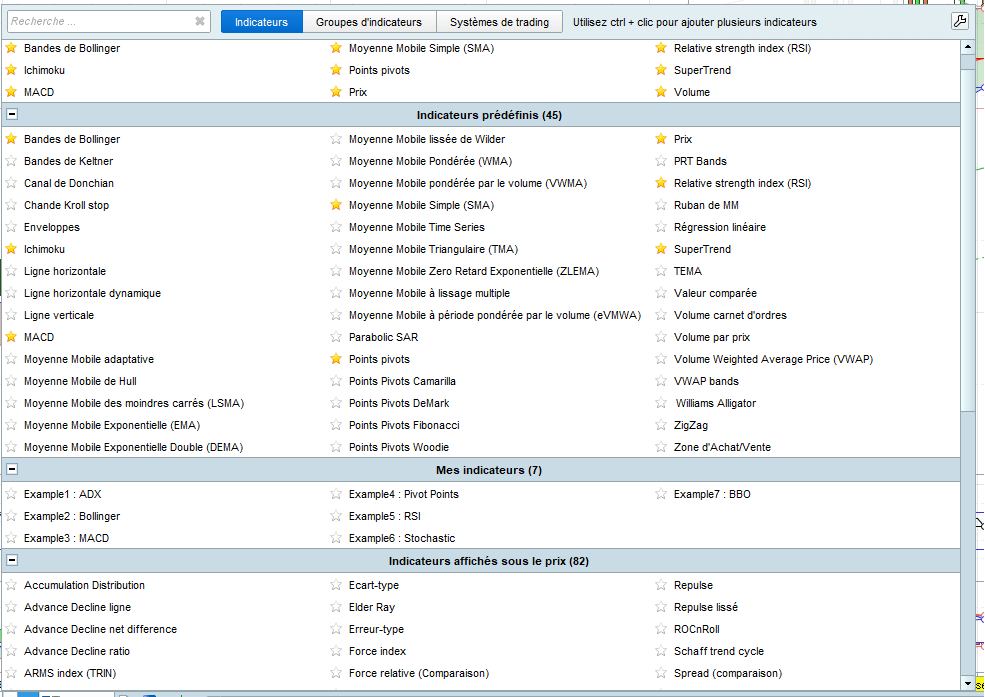
To add an indicator on ProRealTime, simply select the indicator tab and choose the indicator you want to add to your chart.
 Diversifiez votre patrimoineInvestissez dans l’artDes tableaux originaux, pièces uniques signées par l’artiste. Un actif tangible, loin des écrans et des cotations.Voir les tableaux →
ProRealTrend
One of the best features of ProRealTime’s analysis functions is that charts are automatically annotated with support and resistance trend lines. Major and minor support and resistance levels can be shown in different colors or dotted styles, so you immediately know what is going on when you look at a chart for the first time.
It can also be combined with alerts.
With ProRealTrend detection, you can receive an alert when the price approaches ProRealTrend levels. This is very useful if you cannot or do not want to monitor your open positions constantly. If, on the other hand, you are thinking of opening a position, it helps to be alerted when the price approaches interesting zones.
For example, below, ProRealTime automatically detects trend lines on EUR/USD.

The ProRealTime platform also makes it easy to spot assets that are about to change trend or are close to a major support or resistance level.

ProScreener
ProRealTime also includes an advanced market scanning tool that takes advantage of the platform’s wealth of indicators. There are a handful of predefined screens, or you can use a wizard-style tool to build custom screens. One thing to keep in mind is that the screener only works for stocks, stock CFDs and forex, and you cannot search for characteristics such as high volatility across several asset types at once.

Market Data and History
ProRealTime’s data quality is excellent. It meets the following six data quality criteria:
- Ultra-low-latency real-time push data feeds (directly from the exchanges)
- High-availability data feed service
- Reliable data and maintenance services
- Comprehensive historical data (including intraday)
- Unlimited choice of timeframes
- Data display adapted to users’ needs
In addition, data can easily be exported at any time with the DDE data export tool.
The data history is very comprehensive.
For example, daily EUR/USD data is available from June 1979, and hourly EUR/USD data goes back 16 years (5 years in the full version). Daily DAX data is available from January 1997, and hourly DAX data goes back 15 years (5 years in the full version).
You can easily search for a stock name using several criteria such as sector or market capitalization.

Trading with a Stream Deck
You can now trade with ProRealTime using a Stream Deck:
- Faster order placement
- Visual comfort
- Fully customizable
What Kind of Trading Can You Do with ProRealTime? Social, Automated and Manual Trading
In our view, the ProRealTime platform supports every type of trading. You can:
- Trade manually by placing buy and sell orders directly on the chart or via an order book
- Automate your trading strategy and let the platform execute it in the market
- Use ProCommunity to interact with other ProRealTime traders and share your analyses and trading ideas
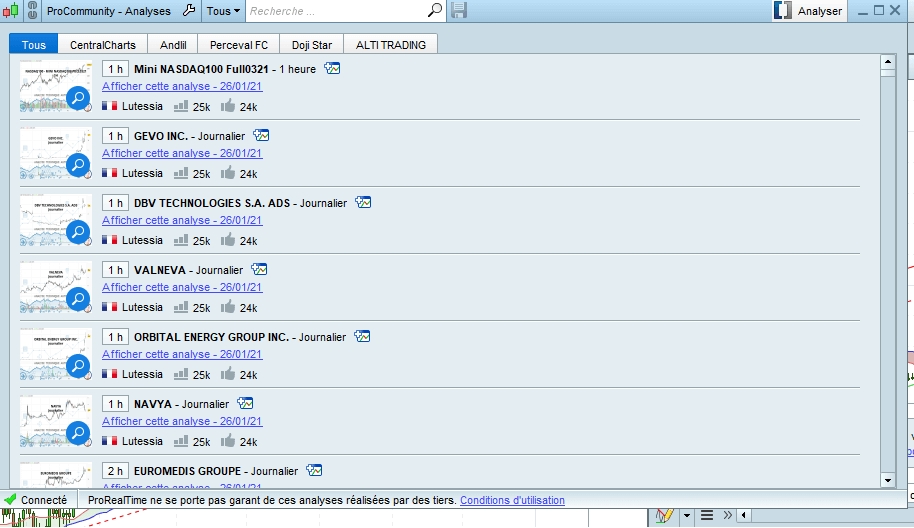
That is why ProRealTime is a comprehensive platform, widely used by proprietary traders and technical analysts.
Automated Trading
With the automated trading tool, you can create and test your own trading strategies.
An additional advantage is that it is based on 100% server-side technology. This means that once your trading system has started, you can turn off your computer, because your system runs on ProRealTime servers.
This provides extra security in case of technical problems, such as a temporary loss of internet access or a power cut. You also get more computing power than your own computer can provide, which is especially useful for complex calculations over shorter timeframes.
Finally, your code is encrypted with encryption keys before being sent to the ProOrder server. This makes it impossible for ProRealTime to read your code, which is exactly as it should be.
The platform includes a few predefined trading strategies for learning and practice.
You can also import and export your own program code.
Which Trading Styles Is ProRealTime Suited To? Long-Term, Scalping and Day Trading
The platform is suitable for any type of trading, although it is best known for scalping and day trading. Thanks to its fast, high-quality order execution, it gives scalpers the right tools for a better trading experience.
- For day trading, the platform works well because it offers suitable charts on any timeframe, and you can view several charts simultaneously with different timeframes.
- For long-term trading, the platform offers an automatic trend detection tool that shows you the trend of the asset you are interested in, so you can invest with peace of mind, since over the long term assets follow the underlying trend.
For example, here on the Nasdaq, the US technology index, the red line is automatically drawn by ProRealTime and shows a trend on a weekly chart.

How to Use ProRealTime: Placing Orders, Trading History and Adding Markets
Example of Opening and Closing a Position
You can place an order on ProRealTime in two ways: either directly from the chart or via the order book.
The fastest way is to place the order directly from the chart using the quick-access bar at the top of your chart. There you can set the order type (buy or sell), the quantity, a stop loss and a take profit target.
Alternatively, you can place your order via the order book. ProRealTime offers three types of order book (horizontal, vertical and best bid/ask).
The method varies slightly depending on the type of order book, but the principle is the same: first set the quantity at the bottom left of the order book, then click buy or sell at the price level you want.
How to View Your Trading History
Your trading history is an important tool for any trader, because it lets you take a step back, see all your transactions and analyze your winning and losing positions.
You can view your history either as a detailed report or as a performance chart showing how your portfolio has evolved.

How to Add a Market on ProRealTime
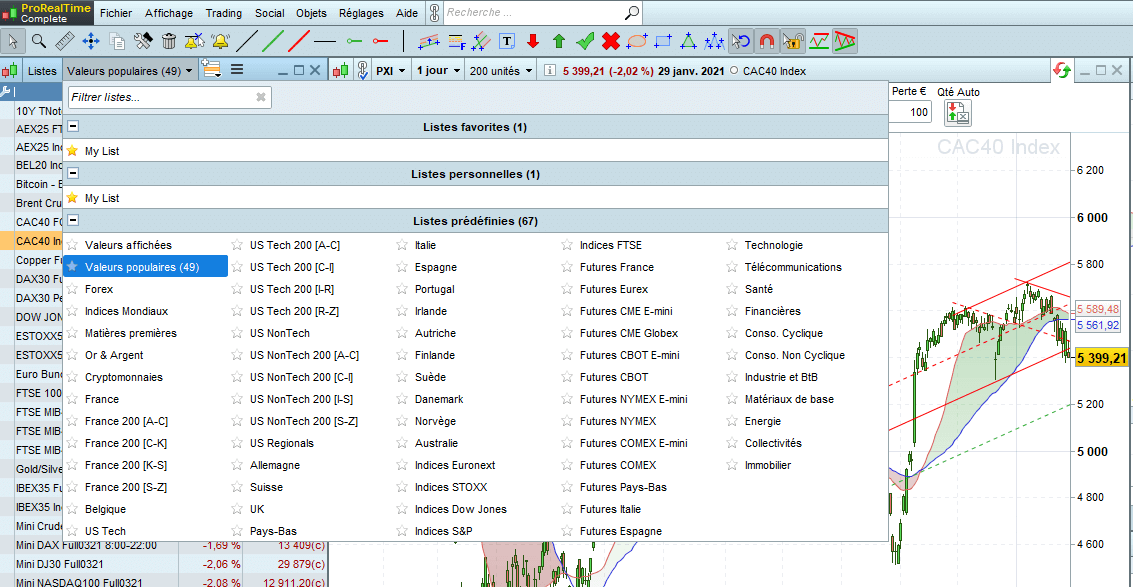
To add a market on ProRealTime, simply click on Lists in the Display menu, and a predefined list of the available asset classes will appear (Forex, French stocks, CFDs).
Then select the market you want, and the charts for that asset will appear automatically.
Is ProRealTime Better Suited to Beginners or Experienced Traders?
In our opinion, ProRealTime is best suited to advanced traders who can take advantage of its backtesting and automation features. The software is expensive once data feeds are factored in, and the strategy development tools are where most of its value lies compared with free technical analysis software.
That said, the free version of ProRealTime, which offers end-of-day data, can also be very useful for swing traders and less experienced traders. Automated trend analysis is extremely helpful, and the software’s many drawing and technical analysis tools are excellent for identifying setups ahead of the next trading day.
ProRealTime is specifically designed for traders who use technical analysis, so it is aimed at a more advanced level than beginner traders, who are unlikely to have mastered technical analysis and Japanese candlesticks.
Is ProRealTime Available on Mobile?
Yes, ProRealTime has a mobile version for iPhone, Android and tablets. It is not an app, however: you can only access it through your smartphone’s web browser.
Training to Get Started with the Platform
To help you master ProRealTime, the platform’s official website offers several simple, well-made tutorials and training resources that help users discover and understand its features.
You can also try ProRealTime with a free demo.
ProRealTime vs TradingView
Although ProRealTime is more powerful than TradingView and offers more technical analysis tools, it is not suitable for beginner traders or novice technical and chart analysts.
That is why TradingView is better suited to beginners: you can look at other people’s analyses and learn technical analysis at the same time.
ProRealTime, on the other hand, is aimed more at advanced, independent traders.
ProRealTime vs MetaTrader 4 and 5
ProRealTime can be difficult to use if it is your first time looking at a stock chart, and you will have a hard time understanding all the technical terms.
MetaTrader, which can be an alternative to ProRealTime, is easier to use, especially for Forex traders.
Automated trading on ProRealTime is difficult and requires very good programming skills, whereas MetaTrader is more intuitive and you will find ready-to-use trading robots.
So, ProRealTime or MT4? It depends on your level of knowledge of trading and chart analysis. But you should try them yourself to see the difference.
ProRealTime: Final Thoughts
The ProRealTime platform is highly valued by technical analysts. As a technical analyst myself, I find that the easy access to information and news about the markets we follow gives us more time to focus on charts and chart patterns.
Our ProRealTime review verdict is that it is the benchmark platform, especially for advanced traders. Trading is a mix of fundamental and technical analysis for better results, but it is also important to have a platform that gives you the best tools to succeed.
ProRealTime Pros | ProRealTime Cons |
|
|
Have you used ProRealTime? If so, share your experience by leaving us a comment!