 cTrader is a forex trading platform developed by Spotware, a company specialising in innovative technology. Spotware has been active in the trading market for more than 10 years and has developed a wealth of tools for the fintech industry. Thanks to its dedicated network of employees, traders, partners and brokers, Spotware has built the trading solution that is revolutionising the field: cTrader. Still relatively new to the markets, cTrader is already highly rated by experts and deserves close attention. In this cTrader review, we look at its features, the brokers that offer it, and its pros and cons.
cTrader: What Is It?
cTrader is a trading platform. Like its counterparts MetaTrader 4 and TradingView, cTrader lets traders analyse their charts, place orders and track them. As mentioned above, cTrader was designed by Spotware to make traders’ daily lives easier and first appeared in 2011.
cTrader is a rather special platform because, as well as having the basic tools offered by MetaTrader 4 or 5, it offers other, more powerful tools. With a fairly intuitive interface, cTrader gives you the all-in-one product you were looking for. Like customisable workspaces? Everything can be customised on cTrader, from the interface to the trading algorithms.
cTrader is not just software. It also comes with a whole host of external modules that can be added to the platform, and the platform’s engineers keep building new ones. cTrader is therefore an evolving platform that welcomes all types of traders.
To make it even more accessible, cTrader is available in 16 languages:
- French,
- English,
- Arabic,
- Portuguese,
- Spanish,
- Italian,
- Greek,
- Turkish,
- German,
- Hungarian,
- Polish,
- Korean,
- Chinese,
- Japanese,
- Russian,
- Vietnamese.
Finally, cTrader has big ambitions: according to Spotware’s CEO, the company is far from satisfied with cTrader’s user-friendliness, features and appeal, even though they are already excellent.
If this topic interests you, also see “FWA Trading Review” and “The Best Expert Advisor“.
cTrader Overview
Would you like an overview of the cTrader platform? We downloaded and tested it to make our cTrader review complete. Discover cTrader’s unique and captivating design below.
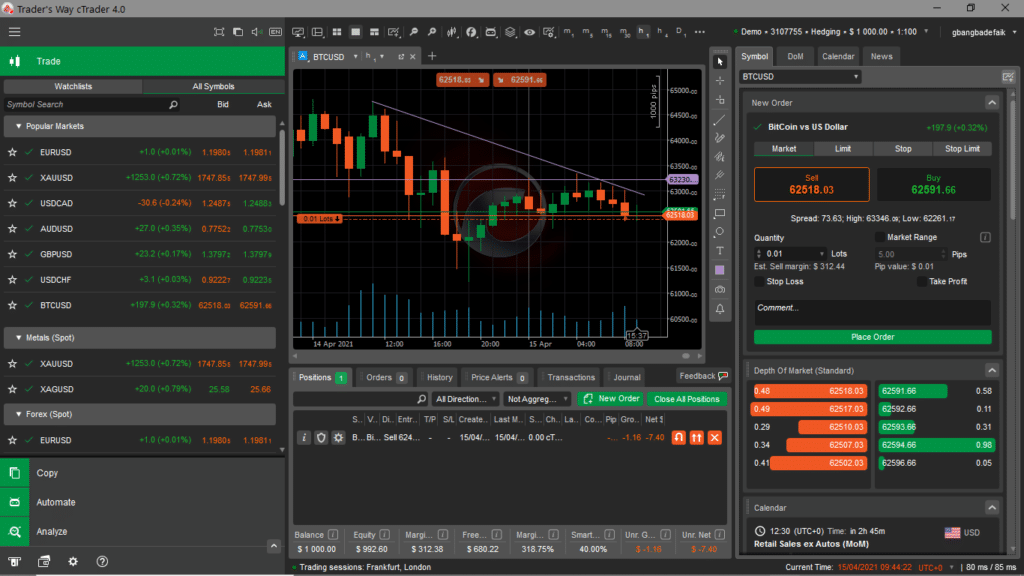
Testing the cTrader Platform
Wondering what your chart will look like during your analysis? Take a look at the BTCUSD chart on the cTrader platform, with an indicator and a few tools added.
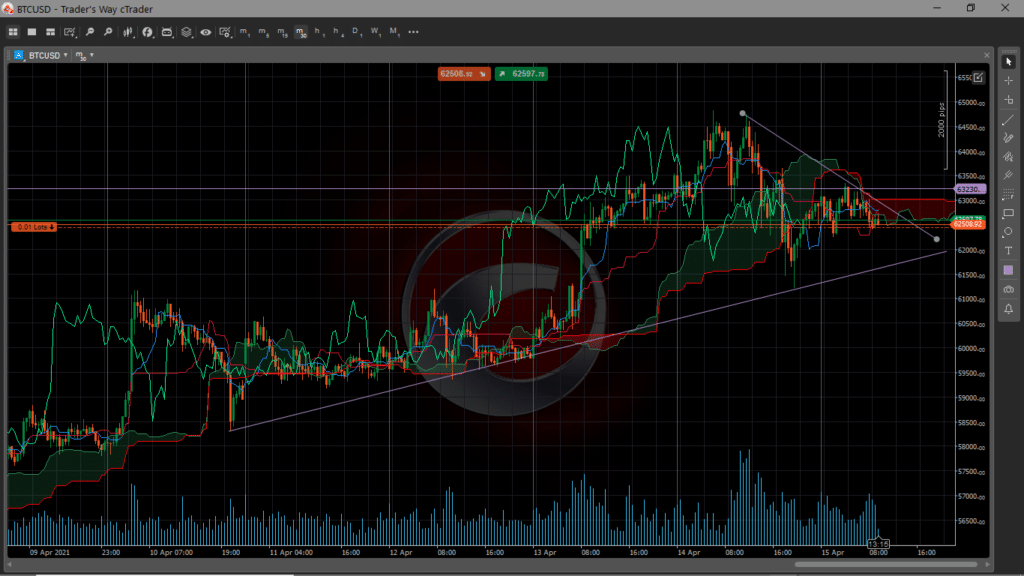
Our cTrader charts and analyses are independent.
cTrader: ECN Platform or Market Maker?
cTrader is a trading platform built on the STP/ECN model. In plain terms, cTrader is an ECN platform. Aware of the problems traders faced with the STP/ECN model on MetaTrader, Spotware decided to help by creating a tool that would satisfy everyone. The result: cTrader was designed with the sole aim of facilitating trading under the STP/ECN model.
As a result, you no longer need external bridges to trade on the markets. cTrader connects you directly with liquidity providers, which greatly speeds up trading on the platform. That is how cTrader became the biggest competitor to MetaTrader 4 and, by extension, 5.
Market Maker Broker | ECN Broker |
|
|
| ★★★★☆ 4/5 | ★★★★★ 5/5 |
What Is the Best Trading Platform?
There are many trading platforms. In reality, each one performs well, but not necessarily for all types of traders. It is therefore wiser to bear in mind that a comparison works best when it is made by type of trader.
However, it is entirely possible to compare existing trading platforms by focusing on their performance and user-friendliness. Here are the best-known platforms.
MetaTrader 4
MetaTrader 4 is probably the best-known trading software. It was designed by MetaQuotes and launched in 2005. MT4 (MetaTrader 4) is known above all for how easy it makes getting started in trading. It offers all kinds of intuitive and powerful features, including the ability to build trading robots, also known as Expert Advisors.
With MetaTrader 4, you get a good number of basic indicators and tools. The software also lets you trade many financial products. MetaTrader 4 offers advantages such as:
- an attractive interface;
- the ability to open several accounts;
- automated trading;
- an MQL4 community;
- all kinds of indicators;
- mobile trading, etc.
What’s more, trading with MetaTrader 4 is very easy.
MetaTrader 5
MetaTrader 5 is a kind of upgrade of MetaTrader 4. Also designed by MetaQuotes, MetaTrader 5 was launched in 2018. In developing MT5, MetaQuotes aimed to improve the features already available on MT4 and, above all, create more interesting new ones. As a result, MetaTrader 5’s charts are improved and traders now have better analysis tools.
MetaTrader 4 | MetaTrader 5 |
|
|
| ★★★★☆ 4.5/5 | ★★★★☆ 4/5 |
| Try MT4 | Try MT5 |
MetaTrader 5 offers advantages such as:
- Fast order execution;
- An MQL5 community;
- Mobile trading;
- Trading of more types of financial products;
- Secure data;
- Direct trading from a smartwatch, etc.
MetaTrader 5 has many other advantages you may enjoy.
ProRealTime
ProRealTime ranks high among the best day trading software available. Created in 2001, it is free and lets you trade. ProRealTime is the software for you if you love being immersed in data. More importantly, the platform was designed under the supervision of the ACPR (Banque de France) and the AMF. You can also trade all kinds of financial products on it, including:
- shares;
- commodities;
- futures;
- forex, etc.
Note that ProRealTime comes in a standard version and a premium version. As you might expect, the premium version is more complete than the standard one.
Choosing ProRealTime means enjoying:
- a financial market scanner (ProScreener);
- many trading indicators;
- the ability to design trading systems with ProBacktest;
- ProRealTrend for drawing support/resistance;
- Automated trading with ProOrder.
Finally, note that ProRealTime is also designed to offer you a secure trading system. Trades are executed very quickly and automated trading is easy to set up.
TradingView
How could we list the best trading software without mentioning TradingView? It is social online trading software. On this platform, you can customise some indicators. You can also benefit from other traders’ analyses, which are called “Ideas” on TradingView. TradingView has more than 3 million monthly users. This online trading platform is available on your computer screen as well as your smartphone.
On TradingView, you get:
- Charts with unrivalled usability;
- Backtesting;
- Social trading;
- The Pine Script programming language to customise your indicators and more;
- Trading alerts;
- A screener, etc.
To close or open any position on TradingView, simply right-click on the chart to bring up the order panel. Then place the order you want.
| Use TradingView |
xStation
xStation also ranks among the most popular trading software. xStation is actually software designed and offered by the broker XTB. It is available in desktop and mobile versions. Choosing xStation gives you access to more than 3,000 assets (indices, forex, shares, ETFs, etc.).
This platform has many advantages, such as:
- Customisable charts;
- An economic calendar;
- The Stock Screener search engine to find shares more easily;
- Powerful charting tools, etc.
Placing orders and closing positions is also easy on xStation. The tools are at your fingertips and the xStation platform is very intuitive.
cTrader Review: What Users Say
Here is a selection of reviews from people who have tested cTrader.
Clients | cTrader Client Reviews | Client Ratings |
Review by Sp4c3d of cTrader | Decent platform with some interesting features. Pivots are wrong on the charts: daily levels are adjusted for each smaller time frame, which makes them useless unless you use the daily time frame. That isn’t an option, though, because the daily chart includes all historical pivots, so it’s unreadable. | ★★★☆☆ 3/5 |
Review by mavrick of the cTrader platform | I love using this platform at home on my Mac, but I find MT4 just a bit faster and smoother on my phone when I’m on the move. That said, the cTrader phone app is still superb. I also like the copy trade features if that’s your thing. | ★★★★★ 5/5 |
Review by ichitrader after using cTrader | Excellent trading platform. I’ve been using it for about a month and I’m impressed. . All features are available in a few clicks. I recommend it to beginners and advanced traders. | ★★★★★ 5/5 |
Review by dizzyj on cTrader’s reliability | The best ECN trading software I’ve used, by far. My only wish is that more brokers offered it. It seems to be offered only by FxPro and a few other small brokers I’ve never heard of. | ★★★★★ 5/5 |
Review by Misho123 of cTrader | One of the most powerful and practical ECN trading platforms. I think it has a great future because it provides almost all of MT4’s features in more powerful technology backed by ECN trading. | ★★★★★ 5/5 |
Review by ForexScam of their experience with cTrader | agreed. The platform is robust and with Visual Studio for C# development, there are no limits! Good job, cTrader cAlgo | ★★★★★ 5/5 |
General review by | The best trading platform I’ve ever used. Superb interface, all the standard tools are available, you can draw lines and objects, compare prices, calculate S&R pips, fast execution with no requotes. I’ve been using it for 3 months and fell in love with the platform, which got me to start switching from MT4 to cTrader. | ★★★★★ 5/5 |
Review by funcky35 of the cTrader service | I’ve used this platform on demo and live. There’s a big problem: it’s impossible to place stop loss orders directly, they’re just deferred; when I place instant orders, it’s just market prices. The breakdown systems need improving to overtake … MetaTrader, and the deposit required on this platform is high, from 1,000 to 2,000 euros or dollars. Is that justified? | ★★★★★ 5/5 |
Review by jwc914 (jwc914) of their experience with cTrader | I had a demo account with cTrader. I managed to reach 200k in less than a year. I was told live accounts weren’t available in the US, so I trade on FXCM. | ★★★★☆ 4.5/5 |
Review by Mrbeatrading (Mrbeatrading) of cTrader | Excellent platform for scalping and more, useful charts with Fibonacci and trend lines, deal map, chart period dividers, and very easy stop loss and take profit setup. | ★★★★★ 5/5 |
General review by kricka of cTrader | A fantastic platform! | ★★★★☆ 4.5/5 |
Review by TheSpotTrader of cTrader | As I said in my other review (of brokers): It’s the only platform I’ve ever used that passes on price improvements on limit orders. And execution times are just wow. Spotware team – I love you. | ★★★★★ 5/5 |
Where You Can Trade With cTrader: The Brokers
To trade with cTrader, you need a trading account with a broker that offers this platform. Here is a non-exhaustive list of brokers offering the cTrader trading platform.
- FxPro;
- IC Markets (copyTrade available);
- Pepperstone;
- Varianse (copyTrade available);
- Fondex (copyTrade available);
- OctaFX (copyTrade available);
- Scandinavian Capital Markets (copyTrade available);
- Skilling;
- OMF (copyTrade available);
- Tradeview Markets (copyTrade available);
- Axiory Global, etc.
These are the main brokers with which you can trade on the cTrader platform. Now discover the full list of cTrader brokers.
Trading Software | Brokers Offering the Software |
 | FX; Alpfin, Axiory; Bull Sphere, Circle Markets; Conotoxia, CPT; EL FX, Fibo Group; Fintec Global Markets, Fondex; Hog FX, FxPro; Global FX, Haxi; IC Markets, ICM; Interstellar FX, Kimura; Link Pro, LP Trades; Market Intelligence, MFM Group; OctaFX, Pepperstone; Pips Pro FX, Purple Trading; RoboForex, Ruby Star Gold; Scandinavian Capital Markets, TopFX; Trader’s Way, Tradeview Forex; United Trade, Xena; Xenia |
 | Admiral Markets, XM, Trade.com, Markets.com, IC Markets, RoboForex, InstaForex, FXTM, AMarkets, BDSwiss, Vantage FxPro, AvaTrade, FxPro, Exness, Alpari, LQDFX, FXOpen, FP Markets, BlackBull Markets, FortFS, ForexMart, XTB, IFC Markets, Pepperstone, TradersWay, Fortrade, SuperForex, GrandCapital, NPBFX, NumberOne CM, FBS, SimpleFX, HotForex, Tifia, FX Choice, HF Markets, IronFX, FreshForex, LiteForex, NordFX, Capital.com, Libertex, LMFX, FiboGroup, Tickmill |
 | Admiral Markets, XM, Trade.com, IC Markets, RoboForex, InstaForex, FXTM, AMarkets, Vantage FxPro, AvaTrade, FxPro, Exness, Alpari, FXOpen, FP Markets, FortFS, Pepperstone, GrandCapital, FBS, HotForex, Tifia, FX Choice, HF Markets, FreshForex, LiteForex, NordFX, Libertex, Markets.com, OctaFx, JustForex, AM Broker, ForexChief, Land-FX, GO Markets, ThinkMarkets, Forex.com, Deriv, RoboMarkets, CityIndex, YHYCM |
 | IC Markets, Binck, ProRealTime Trading and Boursorama, Saxo Bank, Degiro, EasyBourse, LYNX Broker, ING Direct, Alvexo, ProRealTime Trading |
 | XTB |
 | eToro |
Why We Think cTrader Is the Best Platform
There are many reasons why cTrader reviews are so positive. It all starts with the transparent STP (straight-through processing) model it offers traders. With cTrader, traders no longer have to use the bridges set up by brokers on MetaTrader 4. They are connected directly with the main liquidity providers.
You are probably also aware that on other platforms, the risk of brokers manipulating quotes is very high. cTrader puts an end to these fears. On cTrader, your trades benefit from 100% protection. Better still, brokers cannot interfere with quotes, so you see what is happening in real time on each market you trade. When it comes to dealing with brokers, it is also important to note that they cannot reject an order you place.
Worried about slippage? With cTrader, your orders are executed the second you place them, at the price at which you placed them. In addition, bid and ask prices on cTrader move independently of each other, unlike what you may have seen on other platforms. Better still, orders can be opened and closed in a single click. An even more interesting feature is that all orders can be closed at once. Again in a single click, you can double your stake or simply take a trade in the opposite direction to your previous positions.
You can also adopt the trading strategy that suits you: cTrader gives you complete freedom here. The same applies to the volume of your positions. You can execute large volumes flawlessly, without execution delays and with unrivalled ease.
cTrader is also available in mobile, web and desktop versions, so you can manage your orders wherever you are without any problems. You trade on the same account whether you are on your computer or your phone.
For those keen on market depth, cTrader offers three types of market depth. This tool can give you a real head start in anticipating price movements, especially if you are a scalper.
Finally, cTrader also lets you customise indicators with C# and the .NET framework. Put simply, cTrader is the platform designed specifically to make your life as a trader easier.
Top 6 Trading Platforms
Want to know the best trading platform available today? Discover our ranking of the best trading platforms.
Trading Software | Brokers |
| Indices; Currencies; Commodities. Shares. |
| Stock indices |
| Stock indices. |
| Index CFDs |
| Forex; |
| Forex; |
So what will you choose? MetaTrader 4 to start trading? Perhaps you would like to take your first steps with XTB on xStation? And why not try trading with cTrader? You may not have formed your own opinion of cTrader yet. Take the time to analyse each of these platforms to see which one best suits your trading style.
cTrader: Is It a RELIABLE Platform?
cTrader has been developed by Spotware since 2011. Although the platform seemed rather basic at first, offering only the minimum for trading analysis, it has evolved to offer the best to all its users. Everyone can find their way around it more or less easily, provided they take the time to read and understand the documentation available. cTrader has documentation available to everyone, even in video format.
Note also that cTrader was built on the STP/ECN model. This was done solely to let you interact directly with the financial markets without using the ECN bridges set up by brokers. More importantly, the security system cTrader has put in place to protect your trades is very effective and unrivalled in reliability. Not only can no broker stop you from taking a position, but they also cannot close or modify it in any way.
Better still, the quotes you see are in real time. Brokers have no algorithms that would allow them to tamper with quotes and make you lose money. So you can fully trust the quotes cTrader shows you. As for your trades, they are executed the second you press the “Sell” or “Buy” button, at the price at which you wanted to enter the position: no risk of slippage.
Finally, Spotware, the creator of cTrader, even lets you customise your indicators and the various cBots available. You can therefore understand and build an automated trading system tailored to you. Spotware is also very easy to reach: simply contact its customer service on one of its working numbers. cTrader reviews are unanimous: cTrader is the embodiment of a highly reliable trading platform.
Which Are the Best cTrader Brokers?
In this table, discover our cTrader review of the brokers offering the cTrader trading platform.
Broker | Free demo | Regulation | Founded | Rating | |
|---|---|---|---|---|---|
AvaTrade |  | ASIC – Australia | 2006 | ★★★★☆ 4.5/5 | |
Vantage FX |  | Try it | ASIC – Australia | 2009 | ★★★★☆ 4.5/5 |
eToro | | CySEC – Cyprus | 2006 | ★★★★☆ 4.5/5 |
How to Install cTrader
Installing cTrader could not be simpler. Just sign up with a broker that offers the platform. Once that is done, go to the tab that lists the available platforms, where you will find cTrader. Start the download and wait a few moments. Once the download is complete, simply double-click the application’s executable file to start the installation. The process should be fairly quick.
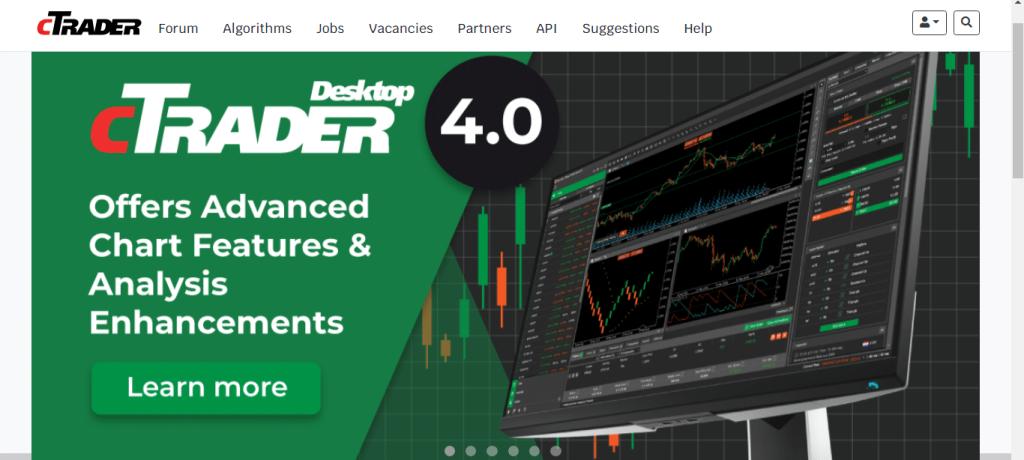
Once cTrader has finished installing, the program should start automatically. You will see the cTrader logo appear on your screen, followed by cTrader opening fully. You have now installed cTrader.
The next step is to enter your account details. If you do not have an account, a demo account will be assigned to you automatically.
What Features Does cTrader Offer?
cTrader has many features. Discover some of them in this section.
cTrader Notifications
You can receive notifications on cTrader. You can set up the platform to alert you when a given price is reached. You can also use this feature to be alerted when your margin reaches a certain level (margin call). Note that these notifications can be sent by email as well as on your desktop, mobile and web platforms.
QuickTrade
cTrader’s QuickTrade feature lets you open positions as fast as possible. It can be activated on trading charts. A window appears with “buy” and “sell” options. Very handy for scalpers, as they can open positions very quickly in a single click.
Smart Stop Out
The Smart Stop Out feature provides optimal protection for the trader’s account. It monitors your margin level. When it falls below a level called the “smart stop-out level”, cTrader starts partially closing open positions.
This process continues until the margin level rises back above that level. Don’t worry: the feature starts by closing the largest positions. Your entry point, and in turn your trading account, is therefore protected.
DoM (Depth of Market)
cTrader offers DoM, the depth of market feature. On cTrader, you get three types of market depth. The first is standard market depth, which helps traders keep track of the prices agreed by most of the main liquidity providers.
The quotes aggregated from these providers help traders better anticipate market dynamics. Next comes price depth, which shows the liquidity available at a given price. Finally, there is VWAP (volume-weighted average price) depth, which shows the average of the prices traded over a given period.
Charts
On cTrader, you can use trading charts. These are the charts linked to the quotes for each of the markets available on cTrader. cTrader charts are customisable and easy to use.
Indicators and Objects
For your trading analysis, you can also use the indicators and objects offered by the cTrader platform. You get all the basic indicators offered by the vast majority of trading platforms, and the same goes for cTrader’s objects. You will therefore have indicators and tools such as:
- Moving averages;
- Oscillators;
- Ichimoku
- Trend lines;
- Rectangles, etc.
Make the most of these tools.
cBots
cBots are to cTrader what Expert Advisors are to MetaTrader: the set of robots you can use to automate your trading on cTrader. With cBots, you get 10 standard robots whose modifications are limited to basic settings.
You can, however, add to your cBots by visiting the cTDN website, which offers a range of automated programs you can download for free or buy.
cAlgo and the 2cAlgo Converter
cAlgo is a platform that lets you design and customise your own indicators and trading robots. cAlgo works with C# and the .NET Framework. cAlgo also has its own text editor, but you can use Visual Studio to code your indicators or trading robots.
The 2cAlgo converter is a program that translates MQL code from the MT4 or MT5 platforms into C# code for cTrader. You can therefore convert the indicators and automated algorithms you use on MetaTrader 4 or 5 and use them on cTrader.
MT-cT Trade Copier
This tool simply copies and transfers your orders between cTrader and MetaTrader 4. In plain terms, you can transfer an order placed on MetaTrader 4 to cTrader. So you can keep your robots on MetaTrader 4 and simply copy the positions they take to cTrader.
 Diversifiez votre patrimoineInvestissez dans l’artDes tableaux originaux, pièces uniques signées par l’artiste. Un actif tangible, loin des écrans et des cotations.Voir les tableaux →
cMirror
With cMirror, you can share your trading strategies and even trading signals. Better still, you can benefit from other traders’ analyses. You do not even need to publish your strategies: other traders can copy them directly from your account.
Deal Map
The Deal Map is simply a representation of each position you have taken at specific times, displayed on the chart of the pair being analysed. This tool helps you better track your trades.
Trading Central
This is a program that analyses many securities at the same time, around 7,000. These analyses come from analysis carried out by other traders on the platform. These scenarios or “setups” are then integrated into the cTrader platform, where everyone can access them.
How to Place an Order on cTrader: Opening and Closing
To place an order (opening and closing) on cTrader, simply use the window just to the right of your chart in the workspace.
In this window, you have four tabs: Market, Limit, Stop and Stop Limit. To open and close a position on the market in real time, at the current moment, stay on the “Market” tab.
Then enter your position details, such as lot size, stop loss and take profit, in the “Stop Loss” and “Take Profit” sections respectively. Once you have entered this information, click “Sell” or “Buy”. This only selects one of the two options; the order will not be placed straight away.
Don’t forget to specify the lot size you want in the “Quantity” section. To place the order, click the “Place Order” button.
For the Limit, Stop and Stop Limit tabs, you need to specify the price at which you want to enter the position. Then configure the order by specifying the lot size, stop loss and take profit, as for a market order.
Note that for each order you place, there is a Trailing Stop feature you can use to adjust your stop loss automatically and secure your positions.
How to Analyse a Chart on cTrader
Analysing charts on cTrader is very easy. Before analysing a chart, you first need to select it. To do so, go to the “Watchlists” window and select the asset you want to analyse. Then enlarge the chart window to full screen.
Now that you are on your chart, you first need to select a time frame for your analysis. The button to do this is just in front of the window title (in front of the asset name).
Once you have chosen your time frame, all that remains is to analyse your chart. As you know, you will need to add indicators and objects. Nothing could be simpler.
To add indicators, simply move your cursor to the top of your screen. There you will find a button marked “f”. When you click it, a list of indicator categories appears. The categories include:
- Trend;
- Oscillators;
- Volatility;
- Volume;
- Other;
- Custom.
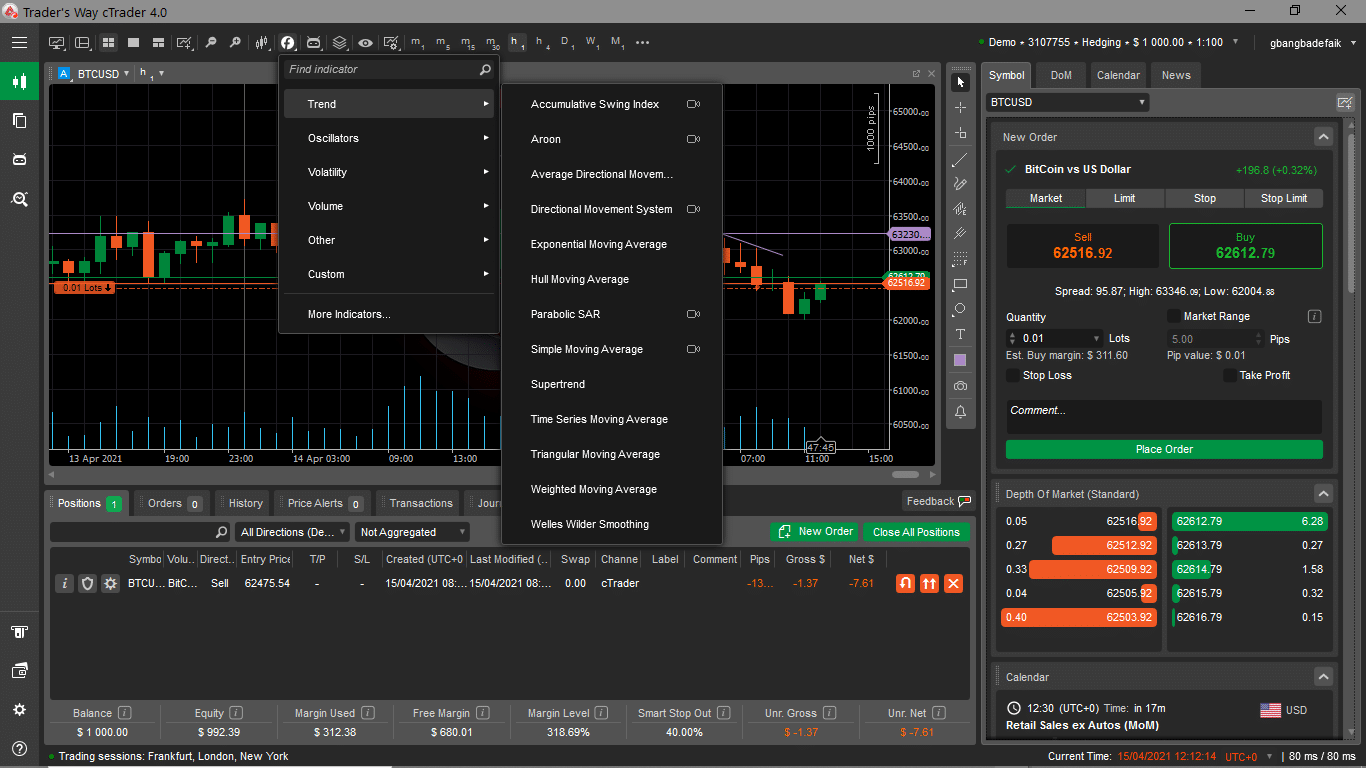
Each of these categories contains indicators. Simply click one of them to open a window, then click “OK” to add the indicator.
For objects, look to the right of the screen. There you will find a floating bar with all the tools you might need.
The process is simple: click an object in the bar to select it, then draw on your chart with the object you have chosen.
In the same bar, just below the mouse symbol, is the crosshair. With the crosshair, you can add more precision to your chart. Feel free to explore the chart to discover everything you can do:
- Zoom in or out;
- Create a template;
- Add other charts;
- Add robots, etc.
Working this way, you will enjoy trading on cTrader more and more.
What People Like Most About cTrader
cTrader reviews are very positive. cTrader fans no doubt love everything cTrader has to offer. Nevertheless, some features stand out.
cTrader’s STP/ECN Model
This model has revolutionised traders’ daily lives. Traders who disliked the bridge model are completely satisfied. What’s more, this model brought new features, such as preventing brokers from manipulating the market and, above all, protecting you from slippage.
Easy Automation
Ease of automation is a significant criterion. cTrader provides its users with very powerful cBots. According to cTrader reviews, this feature not only makes your work easier but also lets you take a break. The most interesting aspect is that you can program your own automated systems with C# and .NET.
DoM, Calendar and News Tools
The DoM (depth of market), Calendar (economic calendar) and News tools let traders carry out fundamental analysis. Traders no longer have to visit specialist websites to keep up with what is happening in the markets they trade.
What Else They Like
According to cTrader reviews, the fact that features are available in a single click is a major advantage that boosts cTrader’s usability. It is also easy to modify pending or open orders directly from the trading charts. You can modify your trades without going to the “Positions” window: simply stay on the chart window you are trading and adjust your stop loss and take profit by dragging them up or down with your mouse.
cTrader reviews also say that cTrader listens to the trading community to improve the platform’s performance.
What Type of Trading Does cTrader Allow: Social, Automated, Manual?
The cTrader platform supports automated trading, manual trading and social trading (copy trading). Automated trading is possible on cTrader thanks to the cBots provided. These cBots come preconfigured and can be used if you know how to handle them. Above all, they can be customised to deliver only the results that suit you. You can therefore implement your trading strategy with a cTrader robot and let it generate gains for you without having to sit in front of your charts all the time.
Manual trading is simple: you carry out your own analysis and take positions. Finally, social trading or copy trading is also available on cTrader. However, note that this option is not available at all brokers offering cTrader. So if you want to use copy trading, you need to choose a broker that offers it.
Which Trading Style Is cTrader Best Suited To: Long Term, Scalping, Day Trading, Swing?
cTrader is suitable for all types of trading. Whatever your style, you can easily trade on cTrader. However, cTrader’s attributes make it the most suitable platform for scalping.
cTrader is first and foremost based on the STP/ECN model, so trades take place directly between the trader and the market. Trades are therefore very fast. This same feature also allows cTrader to avoid all kinds of slippage. Your orders are executed the moment you place them, at the exact price you placed them. Being immune to any manipulation of the financial markets by brokers, cTrader displays quotes in real time, flawlessly.
Scalping is a trading method involving trades that last around 1 to 15 minutes. For such short trades, the trader needs to rely on the information the platform provides, and above all the platform must be fast enough to avoid unfortunate slippage.
cTrader is therefore probably best suited to scalpers. Day traders can also make full use of everything cTrader has to offer. cTrader reviews confirm this, because in day trading, trades are opened and closed on the same day, so it is just as important to have reliable information to read the markets well.
How to View Your Trading History on cTrader
Want to see your trading history on cTrader? Nothing could be simpler! Just go to your cTrader workspace and look at the window just below the chart displayed by default.
By default, this window has six tabs:
- Positions;
- Orders;
- History;
- Price Alerts;
- Transactions;
- Journal.
The tab for your trading history is the third one, the “History” tab.
In this tab, you will see each order you have placed, the date and time you placed it, entry and exit prices, pips won or lost and much more. It is up to you to decide how to use this information to work out what profits you have made and how to improve your strategy to make more.
Next to each closed position is an “i” symbol. When you click it, a window appears with more details about your trade.
This will help you analyse your performance better.
How to Add a Market on cTrader
Adding a market on cTrader is very simple. First, go to the window called “Watchlists”. Once there, click the “Create a new watchlist” button. Then give the new watchlist a name so you can find your way around more easily.
A new list will then be added to your window. Just in front of your new list’s name, you will see a “+” symbol. Click it and the list of market categories you have will appear.
Click the category containing the asset you want to add to see all the symbols in that category.
Finally, click the symbol you want to add to your list and it will appear. You have just added an asset to your platform.
How to Deposit and Withdraw Money on the cTrader Platform
To deposit or withdraw money on your cTrader platform, you have two options. The first and most common is to make the deposit or withdrawal on the website of the broker you trade with. Deposit methods vary from broker to broker, but the most common are:
- Credit cards;
- Bank transfers;
- E-wallets.
Once you are ready to make the transaction, simply choose the option that suits you best.
You can also make withdrawals or deposits via the cTrader platform, which has buttons for this purpose. To find them, go to your cTrader workspace and look at the bottom left of the screen. You will find the “Withdraw” and “Deposit” buttons side by side.
To make a withdrawal, simply press the “Withdraw” button.
Specify the account you want to withdraw from. Then enter the amount you want to withdraw from your cTrader platform. You can also add a comment to complete the transaction. Note that the cTrader platform will tell you how much you can withdraw depending on whether or not you have an open position. To confirm the transaction, press the “Request Withdrawals” button.
To make a deposit, simply press the “Deposit” button.
To make the deposit, specify the account you want to fund. Then enter the amount you want to deposit into your account. Finish by adding a comment to the transaction and press the “Deposit” button.
What Is a Trading Platform?
A trading platform, or trading software, is an application that lets you analyse the financial markets and buy or sell on them. This trading process is called “fundamental analysis”.
For optimal trading, a trading platform must provide the market analysis tools you need.
First, there are indicators. These are programs or algorithms that let you represent price in other forms. Most trading platforms offer some basic ones, such as:
- Ichimoku Kinko Hyo
- Moving averages;
- RSI (Relative Strength Index);
- Bollinger Bands;
- Alligator, etc.
These indicators are added to trading charts after adjusting their settings. A trading platform also provides technical analysis objects for charts, including:
- Trend lines;
- Support/resistance lines;
- Rays;
- Fibonacci retracements;
- Elliott waves;
- Directional arrows;
- Rectangles, etc.
You will also have other very useful tools, such as the crosshair, which shows how the price is moving at a given moment. On the subject of time, a time frame function lets you display quotes on different time scales. Put simply, each candle on the chart corresponds to the length of a trading session. Example: with the 1-hour time frame, you choose to view a series of one-hour sessions.
It is important to note that the tools a platform offers depend on the platform, so you may not find the same tools on every platform.
However, you will find windows such as the one listing the assets you can trade. There is also a section for opening buy or sell positions on these financial markets. Finally, you can track your entries (trades) in a dedicated window, which also shows your trading history.
In short, a trading platform is an application that gives you all the tools you might need to succeed at trading. There are many, including cTrader, ProRealTime and MetaTrader 4/5.
Which Markets Does the cTrader Platform Offer?
cTrader is first and foremost trading software classified as a multi-asset CFD platform (ASP). Put simply, cTrader lets you trade several categories of financial products. You will have access to markets such as:
- Forex;
- Shares;
- Indices;
- Commodities;
- ETFs;
- Cryptocurrencies.
To access the symbols offered by cTrader, simply go to the dedicated “Market Watch” tab, which lets you keep an eye on certain asset classes and assets. If you want to add items to this list, simply click the “Add watchlist” button, then select the assets you want to watch.
How Much Does the cTrader Platform Cost?
The platform is available free of charge to anyone who has opened a trading account with a broker that offers cTrader, such as FxPro, Pepperstone, IC Markets, etc.
However, before you can see your money grow, you will of course need to make an initial deposit. Only then can you take full advantage of everything cTrader offers and make money trading.
Is cTrader a Platform for Beginners or Experienced Traders?
cTrader is much better suited to experienced traders. An experienced trader already knows what they need to optimise their trading performance, so they will make good use of the features and information cTrader provides. Note that mastering cTrader is not always easy for most people, because the platform has a huge number of features. It is therefore an advantage to already know enough about trading to adopt cTrader and master it more easily.
However, a beginner can still use cTrader. In that case, you will need to base all your trading education on cTrader’s features. This approach will take longer, but the results will be worthwhile. You just need to give it your best.
Does the cTrader Platform Have a Mobile Version?
The cTrader platform is available in three versions: web, desktop and mobile. So you can trade online with your Android or iOS phone. You can also use the same account on your phone as on your computer, so you can follow orders you placed earlier on your computer while travelling.
Finally, don’t worry: your trades get the same protection whatever the platform, and you can execute your opening and closing orders as fast as you like, always without slippage.
How Widely Is cTrader Used Around the World?
When it was released in 2011, many traders were still sceptical. However, traders who liked the ECN model quickly flocked to it. Today, cTrader is used by expert traders looking for a platform that can give them very precise information on the markets.
Is There an Online Version of the cTrader Platform (Web Trader)?
As mentioned above, there is a web version of cTrader. It is just as powerful as the desktop version. As with your phone, you can use the same account as on your computer, so you can check your trading orders wherever you are, even if you do not have your computer with you.
In fact, all your settings and positions are stored in cTrader’s cCloud. Put simply, cTrader stores all your essential information and data in a cloud. So even if you lose your computer or are away from it, your platform stays exactly as you customised it on your computer, whatever device you use to access it.
| Learn Trading |
cTrader Pros and Cons
Pros | Cons |
|
|
Training to Get to Grips With the cTrader Platform
cTrader’s developers provide a guide for beginner users. You can use it to master the basics of cTrader and get on better. It is a series of well-structured lessons you can follow in order, as and when you have time. The guide is available 24/7 at https://help.ctrader.com/ctrader. Note that you can translate the lessons into your language to make learning easier.
There is also a library of video tutorials you can follow. Simply move from one video to the next using the menu on the page. The videos can be found at the following address: https://help.ctrader.com/video-library. Once on the page, scroll down to find the video section. Note that the videos are in English. You will need to pay close attention to fully grasp cTrader’s specific features. A good tip is to combine the videos with the lessons mentioned above.
For YouTube fans, cTrader also has a YouTube channel you can use for learning. Make full use of all these tools to learn to handle your new gem perfectly.
How to Choose the Best Platform: The Criteria
If you want to be sure you choose the right trading platform, it is important to have a roadmap to guide you. Here is a non-exhaustive list of criteria to consider when choosing your trading platform.
Usability
Usability is probably the most important criterion. After all, what can a trader do with a platform that does not let them give their best? You should choose a platform you can use without getting lost. Ideally, you should also choose a customisable trading platform, so you can arrange everything as you see fit.
When it comes to usability, make sure indicators are within easy reach so you can add them to your chart. The same goes for analysis objects (trend lines, support/resistance lines, crosshair, etc.). You must be able to reach them quickly.
Finally, look for one-click trading. That way, you can open a position by clicking a single, clearly visible button. Either way, your platform should match your own definition of usability.
Performance
The performance and power the platform offers should also be given serious consideration. To succeed at trading, you need a platform that responds quickly and, above all, does not bug. So choose a platform that offers the best in terms of performance.
Above all, your trading platform should let you add as many indicators as needed without crashing or freezing, so you can trade the way you want.
The Brokers That Offer It
You should also consider which brokers offer the platform. Not all brokers offer every type of trading platform. So before choosing a platform, you should first check whether the broker you have in mind also offers that trading software.
Also note that some platforms work better with certain brokers. The factors involved can vary: they may relate to the assets the brokers offer or to their approach to trading.
Your Trading Style
It is also important not to forget that your trading style plays a big role in choosing your trading software. While a swing trader will opt for TradingView, a scalper will rather choose cTrader. Some platforms are better suited to day trading, others to swing trading and others still to scalping.
So simply remember that before choosing your platform, you must not overlook your trading style.
Your Level as a Trader
Are you a beginner or a professional trader? Did you know that not every platform will suit you depending on your category? A beginner still needs to learn the basics of trading, so a platform offering the basic tools should be perfectly adequate. There is no point getting tangled up in fancy features that are useless at your level.
An experienced trader, on the other hand, knows the basics and therefore knows which tools they might need. They are able to handle a trading platform with many more tools than the basic ones perfectly.
In short, choose the platform that suits your level. As you progress, nothing will stop you from switching to another platform to meet your new needs.
How to Contact cTrader (Spotware)
To contact cTrader, you actually need to contact Spotware. Simply go to Spotware’s official website and send a message. Note that you will need to state your profession to contact them.
You can also reach Spotware directly by phone. There is a specific number for each type of person wanting to get in touch with Spotware.
Here are the channels to use, depending on your profession:
- Sales
For all brokers ready for cTrader
+357 25 344 902
- Marketing
For marketing and press enquiries
+357 25 344 901
- Business partnerships
For any business or technology partnership enquiry
+357 25 344 902
- Human resources
For recruitment and employee wellbeing questions
+357 25 344 901
- Technical support
24/6 IT support for brokers and banks
+357 25 344 905
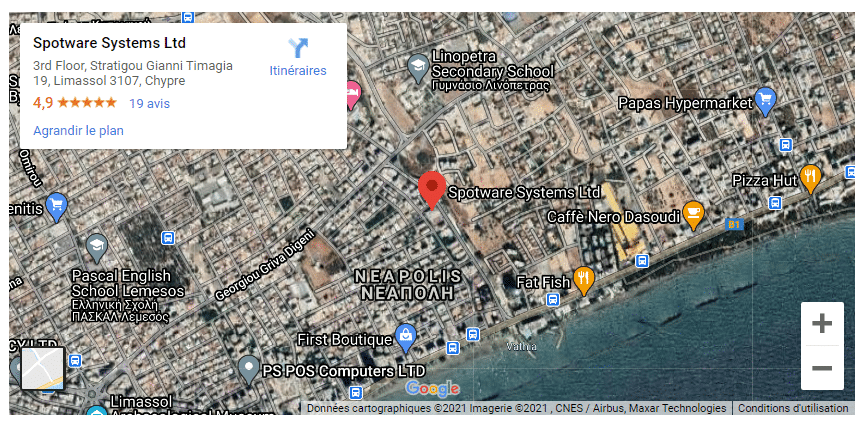
Spotware’s head office is located at: 19 Stratigou Timagia, 3rd Floor, Limassol 3107, Cyprus.
Finally, you can also reach Spotware through its community. To join, simply provide your email address and accept the terms.